

AVAYA DOCUMENTATION CENTER
Find answers to your technical questions and learn how to use our products
Deploying MS Teams Direct Routing with IP Office
Downloading the IP Office Root Certificate in IP Office Web Control/Platform View
If the IP Office system is using a self-signed certificates, use the following process to download the IP Office root certificate using IP Office Web Control/Platform View.
- Login to the IP Office Web Control/Platform View by either:
-
In IP Office Web Manager, select the primary server. Click on
 and select Platform View.
-
Browse to https://<IP Office IP address>:7071 and login as the Administrator.
-
- Select the Settings tab and scroll down to Certificates.
ADDITIONAL INFORMATION:
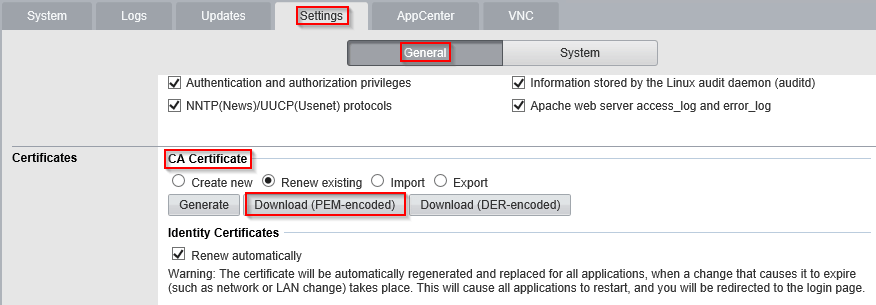
- Under CA Certificate, click on Download (PEM-encoded) and save the root_ca.pem file to your PC.
Next steps
Proceed to generating an ID certificate for the ASBCE:
-
For IP Office subscription mode systems with Automatic Certificate Management enabled, see Generating an Identity Certificate using IP Office Web Manager.
-
For other IP Office systems, see Generating an Identity Certificate using IP Office Web Control/Platform View.