

AVAYA DOCUMENTATION CENTER
Find answers to your technical questions and learn how to use our products
Implementing and Administering Avaya Aura® Media Server
Enabling High Availability
Use this procedure to configure the floating IPv4 (and optionally, IPv6) address on both the Primary and the Backup servers and to activate High Availability.
Before you begin
-
Configure the Primary and the Backup servers.
-
Obtain the desired floating IP addresses designated for the service provided by the media servers.
-
Ensure that both the Primary and the Backup Avaya Aura® MS use a common Network Time Protocol (NTP) server for clock synchronization.
- Navigate to .
- Select Enable High Availability.
ADDITIONAL INFORMATION:
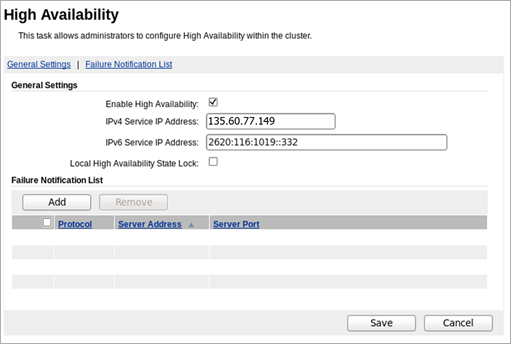
- In the IPv4 Service IP Address field, enter the floating service IPv4 address.
- In the IPv6 Service IP Address field, enter the floating service IPv6 address.
- Clear Local High Availability State Lock check box, if selected.
- In the Failure Notification List area, click Add to add the address of the server in the adopting product which must be notified when a failover occurs.
ADDITIONAL INFORMATION:For information about the address to provide, see the documentation of the adopting product.
- Click Save.
- Click Confirm.
ADDITIONAL INFORMATION:The system restarts to activate the High Availability configuration.
- Perform Step 1 to Step 8 using the same values, for both the Primary and the Backup Servers.