

AVAYA DOCUMENTATION CENTER
Find answers to your technical questions and learn how to use our products
Implementing and Administering Avaya Aura® Media Server
Viewing security logs
Using security logs, you can track all configuration changes to the system. Security logs contain details about changes to the system. The tracked changes include:
-
Exact configuration item that was changed.
-
Old and the new values.
-
Time of the change.
-
IP address of the user who made the change.
Perform the following procedure to gain access to the saved Avaya Aura® MS Security Logs:
- Navigate to .
- Select a security log.
ADDITIONAL INFORMATION:The system displays details of the log in the lower part of the page.Use the vertical and horizontal scroll bars to view information.ADDITIONAL INFORMATION:
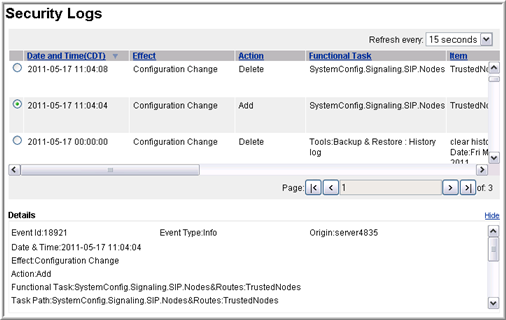
- To set the security data refresh interval, use the Refresh every drop-down menu.
- To move back further in the history of the Security Logs, use the Page navigation buttons.