

AVAYA DOCUMENTATION CENTER
Find answers to your technical questions and learn how to use our products
Implementing and Administering Avaya Aura® Media Server
Configuring Nodal Licensing
In the Nodal Licensing configuration, the system configures each Avaya Aura® MS with a node-locked key that enables features only for that server. The key is based on the unique MAC addresses of each server and does not work on any other server.
Perform the following procedure to configure a nodal license:
- Gain access to EM for each of the servers and click .
- From the Licensing drop-down menu, select Nodal Licensing.
ADDITIONAL INFORMATION:
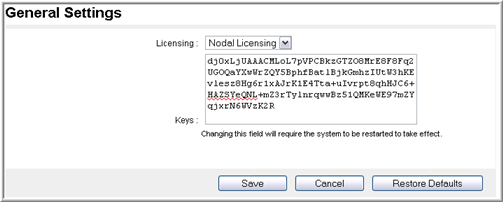
- Apply the license key generated specifically for this server by copying and pasting the license key into the Keys field.
- Click Save.
STEP RESULT:The system displays a confirmation page.
- Click Confirm.
- Navigate to and click Restart to apply the new license.
- Click Confirm.
- To confirm the license configuration, verify that there are no active licensing alarms raised on .
- Repeat Step 1 to Step 8 for each media server in the cluster.