

AVAYA DOCUMENTATION CENTER
Find answers to your technical questions and learn how to use our products
Avaya Proactive Outreach Manager Overview and Specification
POM server configuration options
Based on your outbound notification requirements, you can install POM either on a single server or on multiple servers.
You can use a single POM server for smaller deployments and multiple POM servers for larger deployments. For information on server failover scenarios, see Avaya Proactive Outreach Manager High Availability. For information on Geo-Redundancy, see Implementing Avaya Proactive Outreach Manager.
Single server configuration
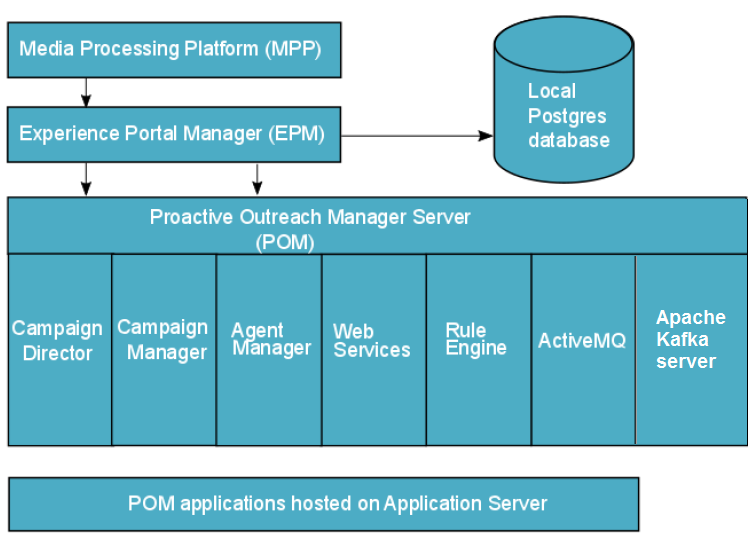
This configuration includes a single server running the Experience Portal Manager (EPM), Media Processing Platform (MPP), POM software with the Postgres database, and the Tomcat application server. You can use a local Postgres database only where you install EPM, MPP, and POM server on a single system.
Tip:
Install the database server and the application server on a separate system for better performance. If you install the database server on one system, and EPM, MPP, and POM server on another system, you can use an external Postgres database, external Oracle database, or external MS-SQL Server database.
Multiple POM server configuration
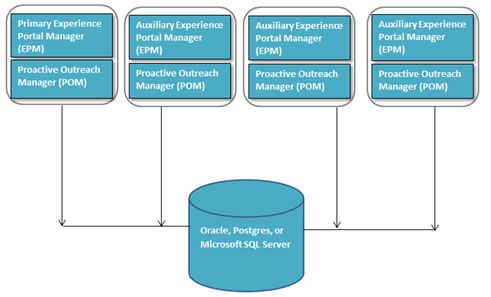
The multiple server configuration includes one or more POM servers, installed on the primary EPM and auxiliary EPM. The EPMS plug-in resides only on the primary EPM.
Install the EPMS plug-in and POM server on the primary EPM system and the desired number of POM servers on the auxiliary EPM systems.
If you installed POM as a multiple server configuration, one of the online POM servers controls the failover and load balancing.
Integration with Avaya Aura®Avaya Experience Platform™ On-Prem and Avaya Aura® Contact Center
For agent-based campaigns, POM integrates with Avaya Aura®Avaya Experience Platform™ On-Prem and Avaya Aura® Contact Center. The MPP is used for standard call classification and outbound dialing. POM provides APIs to integrate with the desktops of third party agents. In POM, you can configure only one Automatic Call Distributor (ACD). For more information about APIs, see Agent API Guide.
You can use MPP for standard call classification and outbound dialing. POM connects with an agent desktop to manage the agents for both inbound and outbound calls.
Note:
You can configure a single Avaya Aura® Contact Center server to communicate with a single POM setup having one primary POM server and multiple auxiliary POM servers. The Avaya Aura® Contact Center server cannot communicate simultaneously with two different POM setups. For more information, see Avaya Aura® Contact Center and Proactive Outreach Manager Integration.