

AVAYA DOCUMENTATION CENTER
Find answers to your technical questions and learn how to use our products
Avaya Proactive Outreach Manager Overview and Specification
Geo Redundancy
POM provides Geo Redundancy support by using MSSQL high availability feature. The solution has an Avaya Experience Portal (EP) system deployed in each data center only for elite mode in an active - active configuration. In an active - active configuration, both the EP systems are running and can share the load of inbound calls. POM components are installed on both the data centers but only one POM system makes outreach attempts at any given time, while the other POM components remain in the standby state. POM database is replicated across data centers by leveraging MSSQL AlwaysOn
High Availability (HA) architecture as shown in the following diagram:
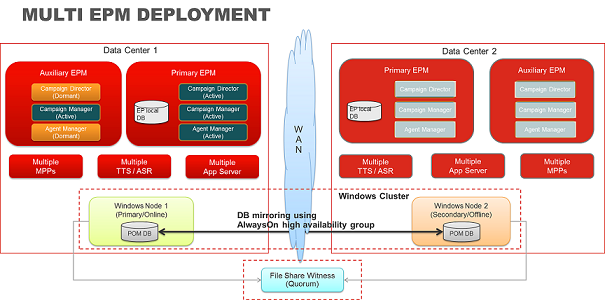
The diagram displays two configured Data Centers (DCs) where each data center is using an independent instance of Experience Portal. Each data center has MPPs, Application servers, and Speech servers configured. POM is deployed in each data center with database clustered so that POM configuration is shared across DCs.
In MSSQL AlwaysOn
HA configuration. only one database is ACTIVE and rest of the databases are in the STANDBY mode. MSSQL provides AlwaysOn
Failover group listener configuration that hides the access to active database from the clients. You must configure POM with AlwaysOn
Failover group listener during installation so that MSSQL JDBC driver can connect to an ACTIVE database. POM systems are deployed in “hot standby” mode which means the POM processes are operational and the manual switch over is instantaneous. The solution assumes rest of the network elements are configured as per relevant supported DC configuration like CM in DC1 with ESS in DC2. In the CC Elite mode, an administrator must configure both the CMs in POM with only 1 ACTIVE CM. Post failover, administrator must manually change the ESS CM mode as ACTIVE by using POM CC Elite Configurations page.
Note:
In a dual data center configuration, if Email / SMS based campaigns are required, then administrator must ensure that only one Email / SMS connection is kept active in the currently active data center.
POM uses the web services of Experience Portal to send email and SMS messages and Experience Portal in return invokes POM application once an Email / SMS notification or messages are received. If both the data centers are configured with same Email / SMS connections, then there are chances that email message and their subsequent responses might get mixed up, thereby causing failure in POM operation. So, the administrator has to ensure that only one Email / SMS connection in DC1 is made active and keep another Email / SMS connections in DC2 disabled. On failover, an administrator can enable the Email / SMS connection in DC2 manually to start Email / SMS campaign processing.