

AVAYA DOCUMENTATION CENTER
Find answers to your technical questions and learn how to use our products
Using IP Office SoftConsole
Configuring the Console’s Locale Directory Entries
On the Incoming Calls tab, you can setup directory names and numbers shown in the Directory panel as the console’s local directory. The directory numbers can be used to make outgoing calls and provide a name match for incoming calls.
You can associate a specific script to display or a media file to be played when the console receives a call from a matching number. For default call handling, you can set a default script or default sound file. These settings apply when the incoming call does not match a specific number that has its own script or sound file assigned.
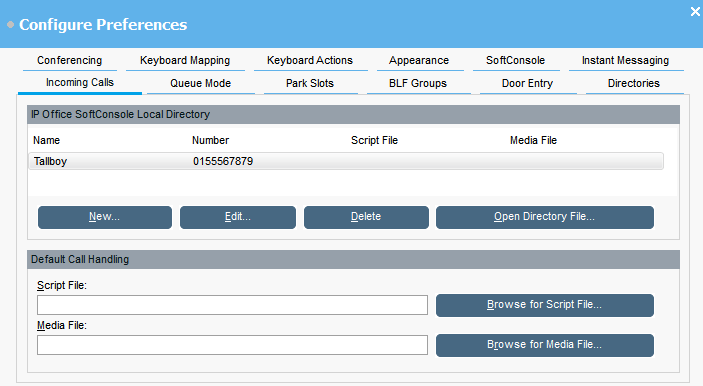
IP Office SoftConsole Local Directory
This table displays the local directory of contacts stored by the console application.
|
Field name
|
Description
|
|---|---|
|
Name
|
The contact name.
|
|
Number
|
The telephone number that is dialed when the directory entry is selected. This number is also used for matching against incoming calls.
|
|
Script File
|
A script can be associated with the directory entry. When an incoming call matches the directory number, the script is displayed in the directory panel. The script can be a .TXT or .RTF file.
|
|
Media File
|
A sound file can be associated with the directory entry. When an incoming call matches the directory number, the file is played by the console PC. The file is a .WAV file.
|
|
Button
|
Description
|
|---|---|
|
New
|
Add a new directory entry.
|
|
Edit
|
Edit the selected entry.
|
|
Delete
|
Delete the selected entry.
|
|
Open Directory File
|
Change the file used for storing the console’s local directory entries. The entries in the selected file are then listed in the window.
|
Default Call Handling
These fields can be used to associate a script file and or media file with any calls that do not have its own script and or media file specified in the directory.
|
Field name
|
Description
|
|---|---|
|
Script File
|
A script can be associated with the directory entry. When an incoming call matches the directory number, the script is displayed in the directory panel. The script can be a.TXT or .RTF file.
|
|
Media File
|
A sound file can be associated with the directory entry. When an incoming call matches the directory number, the file is played by the console PC. The file is a .WAV file.
|