

AVAYA DOCUMENTATION CENTER
Find answers to your technical questions and learn how to use our products
Using IP Office SoftConsole
Putting calls on hold
Put a call on hold so that you can perform another task.
- Click
 or press F4.
ADDITIONAL INFORMATION:To put the current call on hold and answer the next call in one action, press F7.The Held Calls Panel contains a list of all the held calls.STEP RESULT:
or press F4.
ADDITIONAL INFORMATION:To put the current call on hold and answer the next call in one action, press F7.The Held Calls Panel contains a list of all the held calls.STEP RESULT: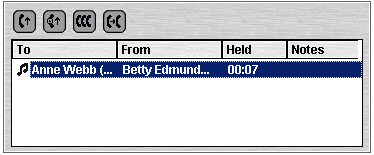
- Sort the list by clicking the corresponding column header.
- Click a row in the list to select the call to answer or transfer.
- Use the icons at the top of the panel as required.