

AVAYA DOCUMENTATION CENTER
Find answers to your technical questions and learn how to use our products
Using IP Office SoftConsole
General console settings
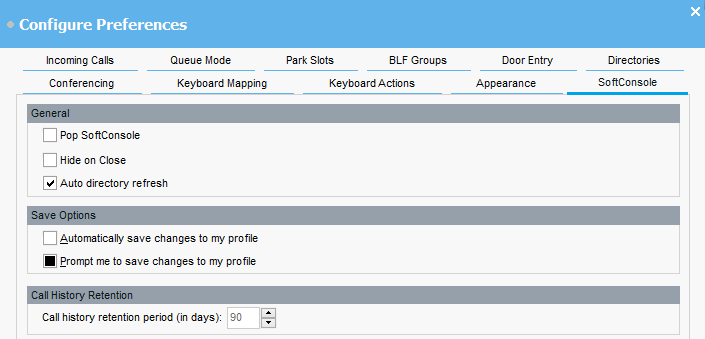
You can define how profile changes are saved. You can also set how the console behaves for incoming calls and when its window is closed.
- Click
 Preferences.
 - Select SoftConsole.
ADDITIONAL INFORMATION:OptionDescriptionGeneralPop SoftConsoleIf selected, the console is brought to the front of all applications running on the PC running when you receive a new incoming call.Hide on CloseIf selected, closing the console minimizes it to the system tray in your Windows task bar. You can exit the application by selecting
 in the system tray and then clicking Exit.
Auto directory refreshIf selected, the console updates the directory contacts from the telephone system every 30 minutes and every time a directory search is performed.If not selected, the contacts are only updated each time the console is started.Save OptionsAutomatically save changes to my profileIf selected, when you close the console, any changes to your console settings are automatically saved to the profile that was selected when logging in.Prompt me to save changes to my profileIf selected, when you close the console, you are prompted whether to save changes to your console settings to the profile that was selected when logging in.Call History RetentionCall history retention period (in days)This value sets how long details of a call remain in the console’s call history before being automatically deleted.
in the system tray and then clicking Exit.
Auto directory refreshIf selected, the console updates the directory contacts from the telephone system every 30 minutes and every time a directory search is performed.If not selected, the contacts are only updated each time the console is started.Save OptionsAutomatically save changes to my profileIf selected, when you close the console, any changes to your console settings are automatically saved to the profile that was selected when logging in.Prompt me to save changes to my profileIf selected, when you close the console, you are prompted whether to save changes to your console settings to the profile that was selected when logging in.Call History RetentionCall history retention period (in days)This value sets how long details of a call remain in the console’s call history before being automatically deleted. - Click OK to save your change.