

AVAYA DOCUMENTATION CENTER
Find answers to your technical questions and learn how to use our products
Using IP Office SoftConsole
Call history view
You can switch between displaying the call history and the BLF/held calls panels. The call history displays details of calls made and received by the console.
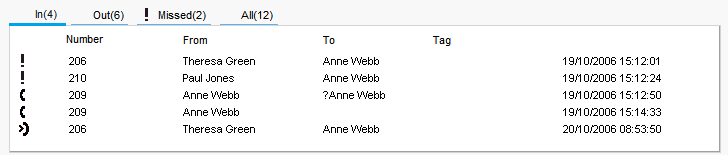
The panel is divided into the following tabs:
|
Name
|
Description
|
|---|---|
|
In
|
Lists all calls received at your extension.
|
|
Out
|
Lists all calls made from your extension.
|
|
Missed
|
Lists all unanswered calls to your extension.
|
|
All
|
Lists all incoming, outgoing, and missed calls.
|
-
The number in brackets after each tab name is the number of calls listed.
-
Each tab can display a maximum of 100 calls.
-
When the maximum capacity is reached, the oldest record is deleted to add a new record.
Within each tab, there are the following call status icons and information:
|
Name
|
Description
|
|---|---|
|
Out (  ) )
|
Indicates a call that was made from your extension.
|
|
In (  ) )
|
Indicates a call that was made to your extension.
|
|
Missed calls (  ) )
|
Indicates a call that was not answered.
|
|
Number
|
Either the incoming telephone number or the telephone number that was called.
|
|
From
|
The name that is associated with the number in the directory on the main system or your local console directory.
|
|
To
|
The name that is associated with the called number in the directory on the main system or your local console directory.
|
|
Tag
|
Text that was entered to identify the call.
|
|
Date
Time
|
The date and time that the call occurred.
|