

AVAYA DOCUMENTATION CENTER
Find answers to your technical questions and learn how to use our products
Administering IP Office Voicemail Pro
Personal Options Menu Action
This action can be used to let a caller alter various user or hunt group settings. Because of the nature of this action it should always be protected by a PIN code set on its General tab.
For an example of the action being used in a call flow, see Using a Personal Options Menu Action.
Any user or group configuration changes made using this method are recorded in the voicemail services log files. The file includes the time, date, details of the change and the CLI of the caller making the change.
- Click the
 Configuration Actions icon.
- Click on the callflow where you want the action placed.
- Connect the new action to the required result of a preceding action.
- Select
 Personal Options Menu.
- Double-click on the action to display its settings tabs.
- The General, Entry Prompts, Reporting and Results tabs are standard tabs available to all actions. See The Start Action and Action Settings Tabs.
- Select the Specific tab. Set the options as required.
ADDITIONAL INFORMATION:
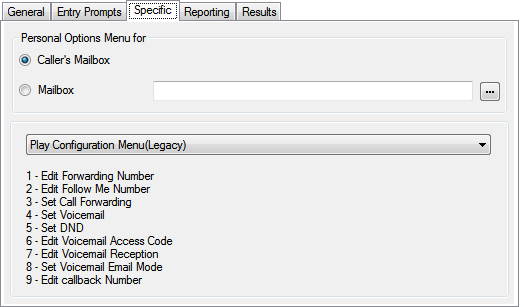 SettingDescriptionCaller's MailboxIf selected, the mailbox matching the start point of the call is used.MailboxSelect or enter the name of the target mailbox. If ? is entered, voicemail will prompt callers to enter the mailbox number required.
-
Clicking on the … browse button allows selection of the target mailbox from a drop-down list of either Start point or module, System defined variables or Mailbox. The options vary depending on the action and field.
Menu ModeThe drop-down box selects the mode used for the menu.-
For systems running in IP Office mode, only Play Configuration Menu (Legacy) is supported.
-
For systems running in Intuity mode, either Play Configuration Menu (Legacy) or Personal Options Menu can be selected.
Play Configuration Menu (Legacy)The options given when a caller accesses this action are listed below. The options marked * can also be set using Generic action commands.UserHunt Group1. Edit forwarding number*.1. Set voicemail on/off*.2. Edit follow me number*.2. Edit voicemail code.3. Set call forwarding*.3. Set voicemail email mode*.4. Set voicemail on/off*.4. Set service mode*.5. Set do not disturb*.–6. Edit voicemail code*.–7. Edit voicemail reception*.–8. Set voicemail email mode*.–9. Edit voicemail callback number*.–Personal Options MenuThe attributes that can be configured via Personal Options menu are only supported on Intuity mode voicemail systems.UserMore options1. Configure mailing lists.1. Set voicemail on/off.3. Configure Fax preferences.2. Set voicemail email mode.4. Edit voicemail access code.3. Set DND.5. Record name.4. Set Follow Me/Forwarding.6. Message address before record.5. Edit Voicemail reception.7. Administer call answer options.6. Edit Callback Number.8. Sort incoming messages.7. Edit Mobile twinning.9. More options... -
- Click OK.
- Connect the action's results to following actions as required.
Result
This action has the following result which can be connected to a further action:
-
Next: Route the call to a following action in the call flow. This connection can be followed even after the caller has hung up if the Start action option Complete Sequence has been selected.