AVAYA DOCUMENTATION CENTER
Find answers to your technical questions and learn how to use our products
Installing the Avaya Solutions Platform 130 Series
Viewing TLS settings in KVM on RHEL 9.6 (Cockpit/Port 9090)
Use the following procedure to view the TLS versions enabled on a KVM on RHEL 9.6 Host (Cockpit/Port 9090).
Note:
In RHEL 9.6, TLS v1.0 and v1.1 are disabled by default in all cryptographic policies.
- Open an SSH session to the KVM on RHEL host using PuTTY. Log in with the custadm credentials.
- Use the OpenSSL command to view the TLS versions enabled or disabled:
-
For TLS 1.2:
openssl s_client -connect localhost:9090 -tls1_2 -
For TLS 1.3:
openssl s_client -connect localhost:9090 -tls1_3
-
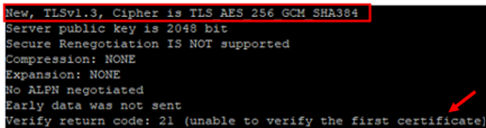
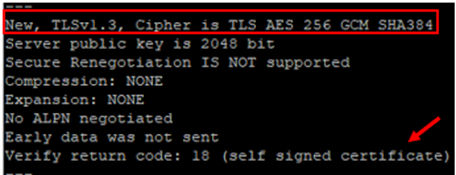
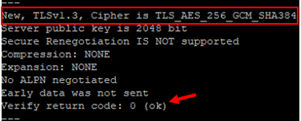
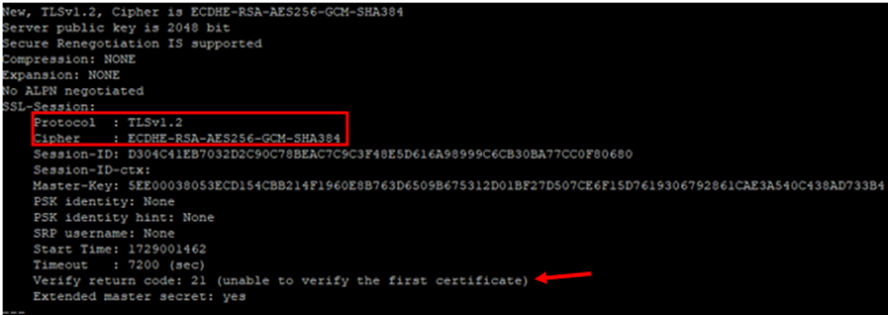
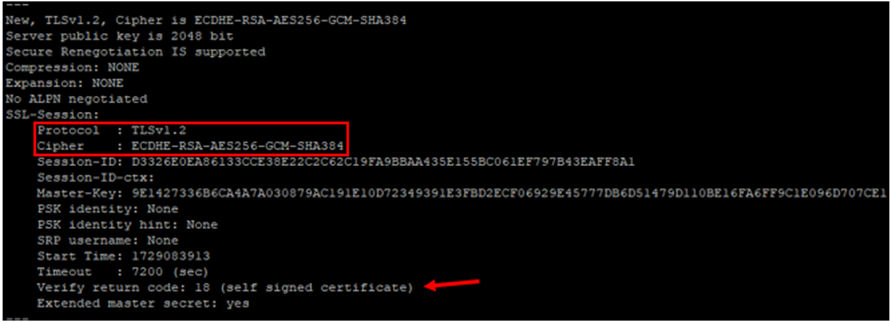
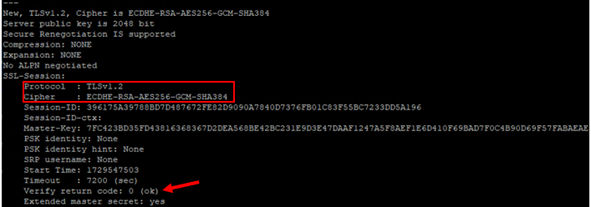
- For TLS v1.2 and v1.3, it displays a unique identifier as shown below:
ADDITIONAL INFORMATION:Note:The system will not be able to verify server's identity and certificate unless the installed SSL certificate has been signed by a trusted Certificate Authority. Verify return code: 21 (unable to verify the first certificate) will be displayed. With an SSL certificate, Verify return code: 18 (self signed certificate) will be displayed. If the root CA is installed in a ca-trusted location (/etc/pki/ca-trust/source/anchors), Verify return code: 0 (ok) will be displayed. Refer to Replacing SSL certificates and Keys with Custom Certificates in RHEL 9.6 - Cockpit Web Service for more details.TLS v1.2:
 TLS v1.3: