

AVAYA DOCUMENTATION CENTER
Find answers to your technical questions and learn how to use our products
Installing the Avaya Solutions Platform 130 Series
Collecting a KVM on RHEL 9.6 SOS Report from the CLI
When there is an issue with the KVM on RHEL host or Avaya Aura® applications, or solution behaviors that require troubleshooting or further investigation by the Avaya support teams, it is required to collect the KVM on RHEL SOS report from the host.
- Open an SSH session to the KVM on RHEL host using PuTTY.
- Log in with the custadm credentials.
ADDITIONAL INFORMATION:Note:User will be prompted to re-enter the custadm password throughout this procedure to use sudo.
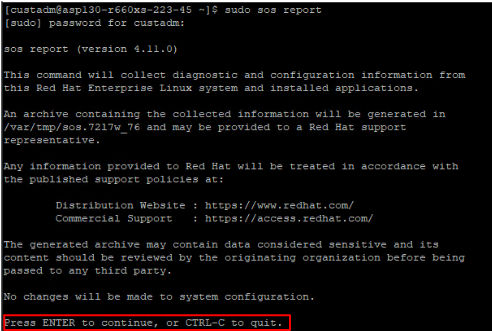
- Run the following command to generate the SOS report: sudo sos report
- Press Enter to continue.
ADDITIONAL INFORMATION:
- It prompts to enter the case id that you are generating the report for, but this is optional, leave blank and press Enter to continue.
ADDITIONAL INFORMATION:
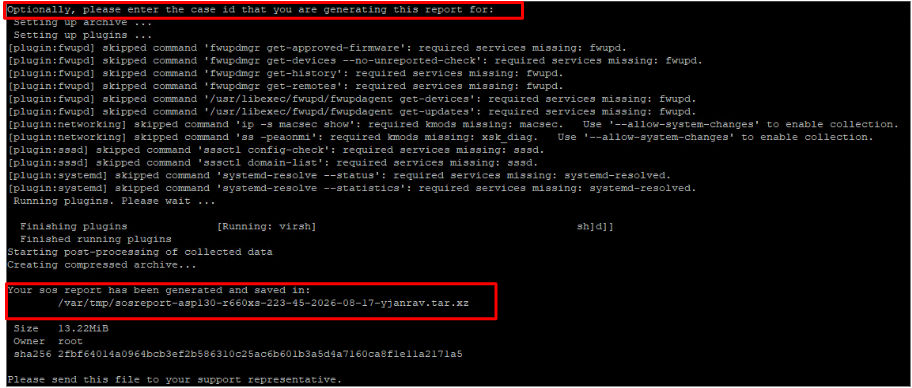 The SOS report will be saved in the /var/tmp/ directory.
- Change directory to /var/tmp/ and list the contents.
ADDITIONAL INFORMATION:

- Copy the sos report tar.xz file and tar.xz.sha256 file to /home/custadm/ directory:
sudo cp <sosreport_name.tar.xz> /home/custadm/sudo cp <sosreport_name.tar.xz.sha256> /home/custadm/
- Change directory to /home/custadm/ and list the contents. The SOS report files will be displayed.
ADDITIONAL INFORMATION:

- Modify the permissions on both files:
sudo chmod 775 <sosreport_name.tar.xz>ADDITIONAL INFORMATION:Example:sudo chmod 775 sosreport-asp130-r660xs-223-45-2026-08-17-yjanrav.tar.xzsudo chmod 775 <sosreport_name.tar.xz.sha256>ADDITIONAL INFORMATION:Example:sudo chmod 775 sosreport-asp130-r660xs-223-45-2026-08-17-yjanrav.tar.xz.sha256
- WinSCP to the KVM on RHEL host and log in with the custadm credentials.
- Go to /home/custadm/ and download the SOS report files to a local machine.
ADDITIONAL INFORMATION:
