AVAYA DOCUMENTATION CENTER
Find answers to your technical questions and learn how to use our products
Installing the Avaya Solutions Platform 130 Series
Configuring SNMP v2 on RHEL 9.6
The SNMP v2 feature is available on KVM on RHEL 9.6. This section provides steps for configuring the less secure SNMP version.
Note:
To align with security best practices, when possible, Avaya strongly recommends configuring SNMPv3 instead of SNMPv2/v1.
Before you begin
Ensure that the SSH functionality is enabled on KVM on RHEL 9.6.
- From a Putty session, using SSH, access the KVM on RHEL host. Authenticate using the custadm credentials.
- Execute the Avaya configSnmp script and follow the prompt to complete the following fields:
ADDITIONAL INFORMATION:
-
System Location (optional): For example, Thornton (could be a site location name, city name, etc.)
-
System contact and email: For example, John Kennedy jkennedy@yourdomain.com
-
System description (optional): For example, Avaya ASP 130 R7.x – (host FQDN)
-
Do you want to enable SNMPv1/SNMPv2c access? y/n: y
-
Enter the Read-Only community string: (): For example, avaya123
-
Do you want to enable SNMPv3 access? y/n: nNote:In this example, only SNMPv2 will be configured, however SNMPv3 can be configured at the same time if required.
-
Do you want to add SNMPv1 trap receivers? y/n: (n) nNote:In this example, only SNMPv2 will be configured, however SNMPv1 can be configured at the same time if required.
-
Do you want to add SNMPv2c trap2 receivers? y/n: (n) y
-
Enter the IP/FQDN of the host receiving the trap2s: 192.168.10.254
-
Enter the optional community to be included: avaya123
-
Enter the optional host port where to send the trap2s: (162) 162
-
Do you want to add another SNMPv2c trap2 receiver? y/n: (n) nNote:In this example a single trap receiver will be configured, however, multiple trap receivers can be configured at the same time.
-
Do you want to add SNMPv2c inform receivers? y/n: (n) nNote:In this example inform receivers are not configured. SNMP inform traps require the SNMP manager (NMS Tool) to send an acknowledgment that it received the inform trap (get-response), therefore providing more reliability. If the manager does not acknowledge the inform trap, the agent will retry sending the inform trap a certain number of times. Both inform traps and snmp traps carry over the same information.
-
Do you want to add SNMPv3 trap receivers? y/n: (n) n
-
Do you want to add SNMPv3 inform receivers? y/n: (n) n
Output example:[root@asp130-r660xs-a31-8HHD ~]# configSnmp
Note: The configured or default value is displayed in parentheses ().
Press 'Enter' to accept it, or type a new value.
Enter the system location: () Thornton
Enter the system contact and email: () John Kennedy jkennedy@yourdomain.com
Enter the system description: (Avaya ASP 130 R7) Avaya ASP 130 R7.x - asp130-r660xs-a31-8HHD.acp.avaya.com
Do you want to enable SNMPv1/SNMPv2c access? y/n: (n) y
Enter the Read-Only community string: () avaya123
Do you want to enable SNMPv3 access? y/n: n
Do you want to add SNMPv1 trap receivers? y/n: (n) n
Do you want to add SNMPv2c trap2 receivers? y/n: (n) y
Enter the IP/FQDN of the host receiving the trap2s: 192.168.10.254
Enter the optional community to be included: avaya123
Enter the optional host port where to send the trap2s: (162) 162
Do you want to add another SNMPv2c trap2 receiver? y/n: (n) n
Do you want to add SNMPv2c inform receivers? y/n: (n) n
Do you want to add SNMPv3 trap receivers? y/n: (n) n
Do you want to add SNMPv3 inform receivers? y/n: (n) n
-
- Verify snmpd service status:
ADDITIONAL INFORMATION:
• systemctl status snmpdASP130 Output Example:[custadm@asp130-r660xs-a31-8HHD ~]$ systemctl status snmpd
● snmpd.service - Simple Network Management Protocol (SNMP) Daemon.
Loaded: loaded (/usr/lib/systemd/system/snmpd.service; enabled; vendor preset: disabled)
Active: active (running) since Sat 2025-03-22 06:30:47 MDT; 2min 45s ago
Main PID: 222051 (snmpd)
Tasks: 1 (limit: 1643572)
Memory: 6.8M
CGroup: /system.slice/snmpd.service
└─222051 /usr/sbin/snmpd -LS0-6d -f
Mar 22 06:30:47 asp130-r660xs-a31-8HHD.acp.avaya.com systemd[1]: Starting Simple Network Management Protocol (SNMP) Daemon....
Mar 22 06:30:47 asp130-r660xs-a31-8HHD.acp.avaya.com snmpd[222051]: NET-SNMP version 5.8
Mar 22 06:30:47 asp130-r660xs-a31-8HHD.acp.avaya.com systemd[1]: Started Simple Network Management Protocol (SNMP) Daemon..
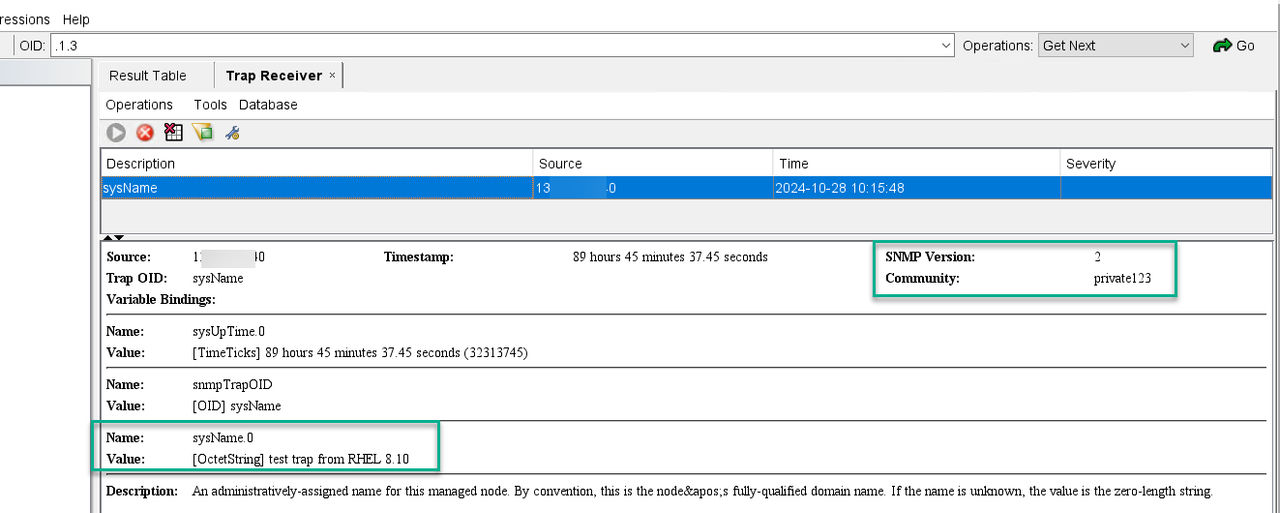
- Generate a SNMPv2 test trap:
ADDITIONAL INFORMATION:
snmptrap -v 2c -c <community-string> <SALGW-IP> '' SNMPv2-MIB::sysName sysName.0 s "test trap from RHEL 9.6"Example:snmptrap -v 2c -c private123 192.168.0.50 '' SNMPv2-MIB::sysName sysName.0 s "test trap from RHEL 9.6"Figure: Trap View from NMS Tool – Use for Example Only