

AVAYA DOCUMENTATION CENTER
Find answers to your technical questions and learn how to use our products
Installing the Avaya Solutions Platform 130 Series
ASP R7.x storage layout
This section outlines the disk partition scheme for the Avaya Solutions Platform (ASP) R7.x – running on Kernel-based Virtual Machine (KVM) with Red Hat Enterprise Linux (RHEL) 9.6. The defined layout is designed to ensure optimal performance, security, and compatibility across supported hardware platforms (S8300E and R660xs) as well as across the full range of supported Avaya Aura® applications. Each partition is listed with its recommended size and functional role, supporting both the host operating system and the virtualized guest environments for application deployment.
Caution:
Unless explicitly instructed by Avaya, DO NOT change, modify, expand or delete any of the partitions listed in this table. Doing so may compromise the integrity of the entire solution and will require a full system re-image to restore the system back to a supported configuration.
Note:
By default, the Linux shell when using for example df -h reports storage in binary units (for example, GiB = 1024³ bytes), unless explicitly specified (for example, df -H for decimal).
Cockpit displays storage in decimal units (for example, GB = 1000³ bytes), so values may appear slightly different when using different interfaces.
|
Partition
|
Size
|
Notes
|
|---|---|---|
|
/boot
|
1 GiB
|
This partition contains the essential operating system kernel, enabling your system to initiate Red Hat Enterprise Linux, along with necessary files utilized during the bootstrap process.
|
|
/boot/efi
|
600 MiB
|
This partition uses the EFI System Partition (ESP) filesystem and is required for systems with a UEFI BIOS. For ASP deployments, all server hardware profiles except the S8300E use UEFI BIOS and therefore require this partition.
|
|
/
|
10 GiB
|
This is the root partition, which contains the root directory (/) of the file system. All files and directories not assigned to a separate partition reside here. For example, it includes the /usr directory, which holds most of the software and system binaries on a Red Hat Enterprise Linux system.
|
|
/var
|
6 GiB
|
This partition stores variable data used by the system and various applications. It includes files such as spool files, and temporary data that change frequently during normal operation.
|
|
/var/log
|
15 GiB
|
The system log files as well as application log files are located under this partition.
|
|
/var/log/audit
|
5 GiB
|
This partition contains the audit log files of the system.
|
|
/tmp
|
3 GiB
|
This partition contains temporary data used by system and applications.
|
|
/var/tmp
|
4 GiB
|
This partition contains temporary data used by system and applications.
|
|
/var/lib/libvirt
|
R660xs with 600 GB HDDs:
R660xs with 1.2 TB HDDs:
|
This partition contains the KVM (Hypervisor) data.
In particular, the VM disk files are stored in the directory /var/lib/libvirt/images.
Note:
The total available storage size may vary depending on the server hardware profile (for example, S8300E, R660xs). The displayed storage for /var/lib/libvirt accounts for a system-reserved allocation of approximately 53.7 GiB, which is used by other system partitions.
|
|
Swap
|
6 GiB
|
Swap partitions support virtual memory: data is written to a swap partition when there is not enough RAM to store the data your system is processing.
|
|
/opt/avaya/asp/guestinfo
|
~32 - 50 MiB
|
This partition is shared and mounted within guest virtual machines, enabling file-based communication between the host server and its guest VMs. It ranges between 32 and 50 MiB based on hardware profile.
|
|
/home
|
3 GiB
|
This partition contains the home directories of system users. For example, /home/custadm is the home directory for the custadm user. It is typically used to store user-specific data separately from system files. However, since ASP server functions as a hypervisor appliance with minimally expected user data, this partition is allocated a relatively small size.
|
Note:
Usable Virtual Disk Capacity has been reduced by 20% to allow for upgrades and storage overhead.
Visual diagram: ASP R7.x disk partition layout
The following diagram visually represents the partition layout described in this document:
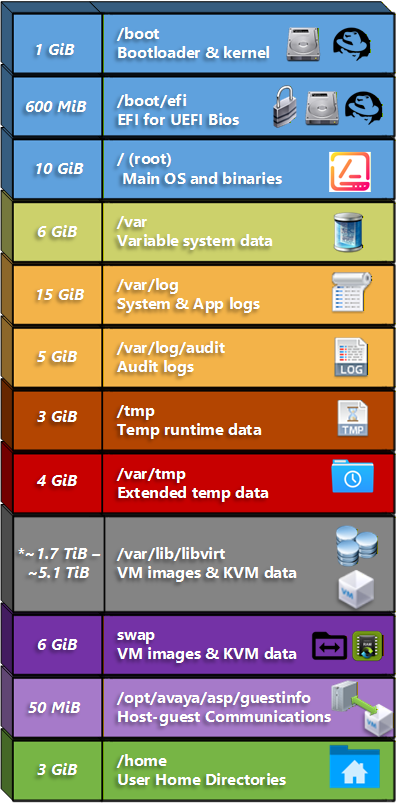
* Total available storage size minus ~53.7 GiB used for other system partitions. This number varies depending on the ASP R7.x hardware server profile:
-
600 GB drives in A1, A2, A3 are ~1.7 TB, A31 with 600 GB drives is ~2.6 TB
-
R660xs with 1.2 TB drives in A1, A2, A3 is ~3.4 TB and for A31 is ~5.1 TB