

AVAYA DOCUMENTATION CENTER
Find answers to your technical questions and learn how to use our products
Installing the Avaya Solutions Platform 130 Series
Creating a user generated SSL Self-signed Certificate
- Log in to the first KVM on RHEL 9.6 host by using a Secure Shell (SSH) client i.e. Putty (not provided by Avaya).
- Authenticate using the existing custadm credentials.
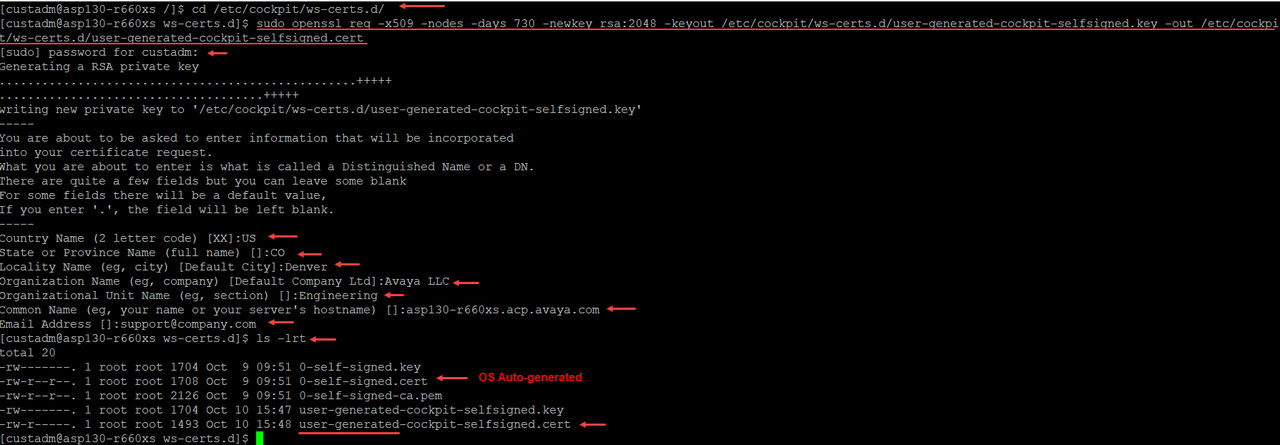
- Run the following command to re-generate the self-signed certificate on the connected host:
ADDITIONAL INFORMATION:
cd /etc/cockpit/ws-certs.d/
 sudo openssl req -x509 -nodes -days <#days> -newkey rsa:2048 -keyout
 /etc/cockpit/ws-certs.d/<cockpit-file>.key -out /etc/cockpit/ws-certs.d/<cockpit-file>.cert
Note:In the following example the value associated with days is set to 730 days (2 years), default certificate has a validity of 395 days. Update value accordingly to align with customer company security policies and best practices.Note:The encryption Key file and Certificate file name must be the same. Labels used in this example are just for representation purposes only. Change as needed to align with customer requirements.Example:sudo openssl req -x509 -nodes -days 730 -newkey rsa:2048 -keyout
/etc/cockpit/ws-certs.d/user-generated-cockpit-selfsigned.key -out
/etc/cockpit/ws-certs.d/user-generated-cockpit-selfsigned.cert
Enter custadm password
System will ask to the end user to enter information that will be incorporated into the certificate request, use below information as an example, update values accordingly to match customer site information:-----
Country Name (2 letter code) [XX]:US
State or Province Name (full name) []:CO
Locality Name (eg, city) [Default City]:Denver
Organization Name (eg, company) [Default Company Ltd]:Avaya LLC
Organizational Unit Name (eg, section) []:Engineering
Common Name (your server's FQDN) []:asp130-r660xs.acp.avaya.com
Email Address []:support@company.com #### Press Enter###
ls -lrt
- Run the following command to restart the Cockpit Service in the KVM on RHEL 9.6 host:
ADDITIONAL INFORMATION:
sudo systemctl daemon-reload
 Enter custadm password
 sudo systemctl restart cockpit
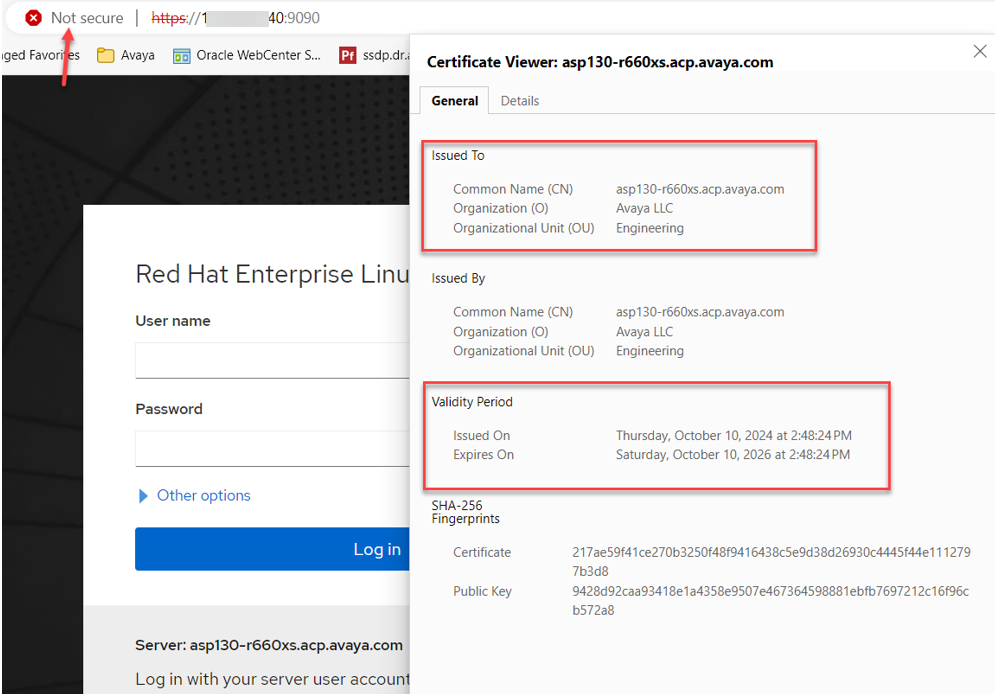
- Before attempting to re-login to the KVM on RHEL 9.6 web user interface (Cockpit) to validate the new SSL certificate installed, clear browser history, cache, and cookies from all previously used browsers.
ADDITIONAL INFORMATION:Note:Refer to each browser's documentation if needed when doing so.Note:Browsers will continue to report the connection to Cockpit as not secure, even if the regenerated self-sign certificate gets installed on the client PC. This is because nowadays browsers consider self-signed certificates as insecure, same as with industry standard security scans. Avaya strongly recommends customers to replace SSL self-signed certificates with CA signed certificates.
Next steps
Repeat the entire process for all remaining ASP 130 R660xs servers.