

AVAYA DOCUMENTATION CENTER
Find answers to your technical questions and learn how to use our products
Installing the Avaya Solutions Platform 130 Series
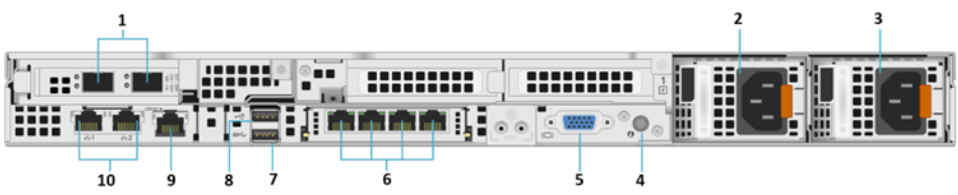
Rear view of Dell™ PowerEdge™ R660xs Server

|
No.
|
Item
|
Icon
|
Description
|
|---|---|---|---|
|
1
|
PCIe expansion riser card 1 slot (1)
|
N/A
|
Avaya Solutions Platform 1XX systems with R660xs server have a 2x10/25 GbE Broadcom NIC installed (BCM57414) in PCIe slot 1. In KVM on RHEL 9.6 these network interfaces will be displayed as: ens1f0np0, ens1f0np1. (Right-to-left assignment if viewing from rear of the server).
ASP Server must be at BIOS FW v2 or later.
This Network Card is only populated in Profiles: A3-A31.
|
|
2
|
Power supply unit (2)
|
 |
PSU1 is the primary PSU of the system. Can accept voltages from 100-240VAC.
|
|
3
|
Power supply unit (2)
|
 |
PSU2 is the secondary PSU of the system. Can accept voltages from 100-240VAC.
|
|
4
|
System identification button (ID)
|
 |
Press the system ID button:
|
|
5
|
VGA port
|
 |
Enables connection to the display device (console) of the system. If the user is connected to the front VGA port, the rear VGA port will not function.
|
|
6
|
OCP NIC ports (4)
|
N/A
|
4x1 GbE OCP NIC card. (eno12399, eno12409, eno12419 and eno12429 – Left to right viewing from rear of the server).
|
|
7
|
USB 3.0 port
|
 |
This USB port is a 9 pin connector and 3.0-compliant. This port enables you to connect USB devices to the system (use for bootable ISO).
|
|
8
|
USB 2.0 port
|
 |
This USB port is a 4 pin connector and 2.0-compliant. This port enables you to connect USB devices to the system.
|
|
9
|
iDRAC9 dedicated port
|
 |
If enabled and cabled allows you to remotely access iDRAC.
|
|
10
|
NIC ports (2)
|
 |
2 x 1 GbE NIC ports integrated on the system mother board. (eno8303 {Management} and eno8403 {Services} ports)
|