AVAYA DOCUMENTATION CENTER
Find answers to your technical questions and learn how to use our products
Installing the Avaya Solutions Platform 130 Series
Generating the certificate signing request in KVM on RHEL 9.6
Before you begin
You must complete Creating the Certificate configuration file for KVM on RHEL 9.6 host before continuing with the following procedure.
- Using Putty or any other appropriate SSH tool, open a new SSH session to the selected KVM on RHEL 9.6 host during the certificate configuration file creation steps. Login using the existing custadm credentials.
- Run the following commands:
-
-
sudo mv /home/custadm/<server-config-file>.cfg /etc/cockpit/ws-certs.d/ [sudo] password for custadm: -
cd /etc/cockpit/ws-certs.d/ -
ls -lrt(to validate configuration file has been properly moved)[custadm@asp130-r660xs ~]$ sudo mv asp130-r660xs-RHEL96acpavayacom.cfg /etc/cockpit/ws-certs.d/
[sudo] password for custadm:
[custadm@asp130-r660xs ~]$ cd /etc/cockpit/ws-certs.d/
[custadm@asp130-r660xs ws-certs.d]$ ls -lrt
total 16
-rw-------. 1 root root 1704 Aug 14 07:49 0-self-signed.key
-rw-r--r--. 1 root root 1797 Aug 14 07:49 0-self-signed.cert
-rw-r--r--. 1 root root 2244 Aug 14 07:49 0-self-signed-ca.pem
-rw-r-----. 1 custadm custadm 1004 Aug 14 07:55 asp130-r660xs-RHEL96acpavayacom.cfg
-
hostname(to display current system hostname)Note:Hostname for both Key and CSR must be exactly as displayed in previous step. -
sudo openssl req -new -sha256 -nodes -out <HOSTNAME>.csr -newkey rsa:2048 -keyout <HOSTNAME>.key -config <server-config-file>.cfgExample:sudo openssl req -new -sha256 -nodes -out asp130-r660xs.acp.avaya.com.csr -newkey rsa:2048 -keyout asp130-r660xs.acp.avaya.com.key -config <server-config-file>.cfg -
ls -lrtNote:Two new files <HOSTNAME>.key and <HOSTNAME>.csr will be listed.Note:The following output example uses the configuration file previously created and transferred during Creating the Certificate configuration file for KVM on RHEL 9.6 host asp130-r660xs-RHEL96acpavayacom.cfg. Bear in mind that configuration files will change per each KVM on RHEL 9.6 host when generating the certificate signing request (CSR).[custadm@asp130-r660xs-RHEL96 ws-certs.d]$ hostname
asp130-r660xs-RHEL96.acp.avaya.com
[custadm@asp130-r660xs-RHEL96 ws-certs.d]$ sudo openssl req -new -sha256 -nodes -out asp130-r660xs-RHEL96.acp.avaya.com.csr -newkey rsa:2048 -keyout asp130-r660xs-RHEL96.acp.avaya.com.key -config asp130-r660xs-RHEL96acpavayacom.cfg
.......+...............+...+......+.+...+..............+.+.....+......+...+.............+............+++++++++++++++++++++++++++++++++++++++++++++++++++++++++++++++++*......+++++++++++++++++++++++++++++++++++++++++++++++++++++++++++++++++*....+.......+.....+.+...........+...+.+.....+.......+.........+..
[custadm@asp130-r660xs-RHEL96 ws-certs.d]$ ls -lrt
total 24
-rw-------. 1 root root 1704 Aug 14 07:49 0-self-signed.key
-rw-r--r--. 1 root root 1797 Aug 14 07:49 0-self-signed.cert
-rw-r--r--. 1 root root 2244 Aug 14 07:49 0-self-signed-ca.pem
-rw-r-----. 1 custadm custadm 1027 Aug 14 08:22 asp130-r660xs-RHEL96acpavayacom.cfg
-rw-------. 1 root root 1704 Aug 14 08:22 asp130-r660xs-RHEL96.acp.avaya.com.key
-rw-r-----. 1 root root 1322 Aug 14 08:22 asp130-r660xs-RHEL96.acp.avaya.com.csr
-
sudo openssl req -in <HOSTNAME>.csr -noout -textNote:This will help you to validate certificate entries before submitting the certificate signing request file to the Certificate Authority (CA).[custadm@asp130-r660xs-RHEL96 ws-certs.d]$ sudo openssl req -in asp130-r660xs-RHEL96.acp.avaya.com.csr -noout -text
[sudo] password for custadm:
Certificate Request:
Data:
Version: 1 (0x0)
Subject: C=US, ST=CO, L=Denver, O=AVAYA LLC, OU=ASP-Engineering, CN=asp130-r660xs-RHEL96.acp.avaya.com, emailAddress=asp-support@avaya.com
Subject Public Key Info:
Public Key Algorithm: rsaEncryption
Public-Key: (2048 bit)
Modulus:
00:c1:fd:7b:17:cd:6c:a7:b0:4f:41:89:6a:da:f4:
25:24:cd:9b:04:23:a3:ab:76:2e:75:0d:7e:9a:d1:
b0:38:93:10:0f:e2:b8:3b:e4:79:2c:36:87:61:e0:
6f:13:65:e8:6a:7e:cf:78:0d:16:62:a0:09:de:1f:
c9:97:77:09:0d:04:26:b3:b8:93:b7:f3:26:cf:74:
b0:4a:2f:4e:51:a8:cc:60:2a:d1:e5:cb:90:e1:61:
59:a4:c0:2e:a3:41:81:50:64:22:a8:21:8c:c4:a4:
a1:68:3c:c9:74:9c:1c:0f:2b:c0:8f:37:f2:80:a3:
d7:82:01:2a:22:b7:58:d2:29:1e:8c:4a:96:54:42:
ed:31:aa:16:3b:43:5b:01:95:d1:c3:eb:5f:e4:90:
55:dd:81:e8:7a:e3:2f:bb:9e:c0:c1:1e:95:68:e0:
f1:9a:30:83:72:1b:2d:b2:64:f4:06:2f:ec:0d:bb:
a5:6f:56:76:6f:4e:fc:b4:af:94:f3:72:77:6f:14:
31:69:e7:00:78:a9:40:76:53:e0:24:0b:d4:96:7c:
8a:54:22:7a:2c:bf:77:a1:81:64:f5:9e:4f:5b:0f:
67:10:86:99:41:45:e5:fe:90:af:d8:8b:eb:0e:5a:
5c:a3:3b:67:85:13:37:57:ca:6e:7c:c9:01:4d:01:
39:af
Exponent: 65537 (0x10001)
Attributes:
Requested Extensions:
X509v3 Basic Constraints:
CA:FALSE
X509v3 Key Usage:
Digital Signature, Key Encipherment, Data Encipherment
X509v3 Extended Key Usage:
TLS Web Server Authentication, TLS Web Client Authentication
X509v3 Subject Alternative Name:
DNS:asp130-r660xs-RHEL96.acp.avaya.com, DNS:asp130-r660xs-RHEL96.acp.avaya.com, IP Address:135.9.223.20
Signature Algorithm: sha256WithRSAEncryption
Signature Value:
34:35:de:d3:f6:b1:e8:1c:1d:ca:3d:05:11:3c:2f:82:68:2d:
23:5e:de:7b:8f:31:a0:96:73:a0:31:a4:83:9c:fd:d6:e2:a1:
21:ff:79:4a:0a:f0:b2:68:7a:e5:da:48:10:13:70:3b:75:5f:
e1:a3:7b:8c:ca:6c:ed:1d:38:6e:14:ca:4b:30:55:cc:99:b5:
36:54:57:1d:d6:c0:2e:98:e6:53:a4:93:80:94:27:8c:07:66:
05:2f:0d:e8:06:40:09:02:cd:50:32:f2:24:25:b1:0b:de:c5:
4e:0b:c9:ff:80:52:0d:60:b7:fc:e3:36:10:6b:43:69:be:1b:
28:db:e7:7f:3d:a4:c4:29:65:6d:36:6f:69:cb:02:12:c3:83:
12:b4:98:40:0e:d4:2f:74:4f:4f:f4:ed:72:2a:ee:3d:a0:2d:
99:85:30:d5:0b:70:fa:32:97:bf:cb:ed:0e:2f:be:24:9b:b5:
d6:5d:ca:b6:f6:46:49:db:a3:d4:2a:a2:0c:f1:23:7c:87:37:
2a:81:98:b0:e5:1a:03:a1:bc:84:96:06:29:fe:1d:d6:de:59:
a4:86:63:d4:b5:22:15:34:47:58:3b:f0:aa:46:ff:64:65:db:
ed:3b:f0:1e:df:00:e2:f1:ca:8b:2c:d5:bb:43:3e:23:9d:ac:
4e:e5:ab:c8
-
sudo cp <HOSTNAME>.csr /home/custadm/Example:[custadm@asp130-r660xs-RHEL96 ~]$ sudo cp /etc/cockpit/ws-certs.d/asp130-r660xs-RHEL96.acp.avaya.com.csr /home/custadm/
[sudo] password for custadm: -
cd /home/custadm -
sudo chmod 644 <HOSTNAME>.csrExample:sudo chmod 644 asp130-r660xs-RHEL96.acp.avaya.com.csr
-
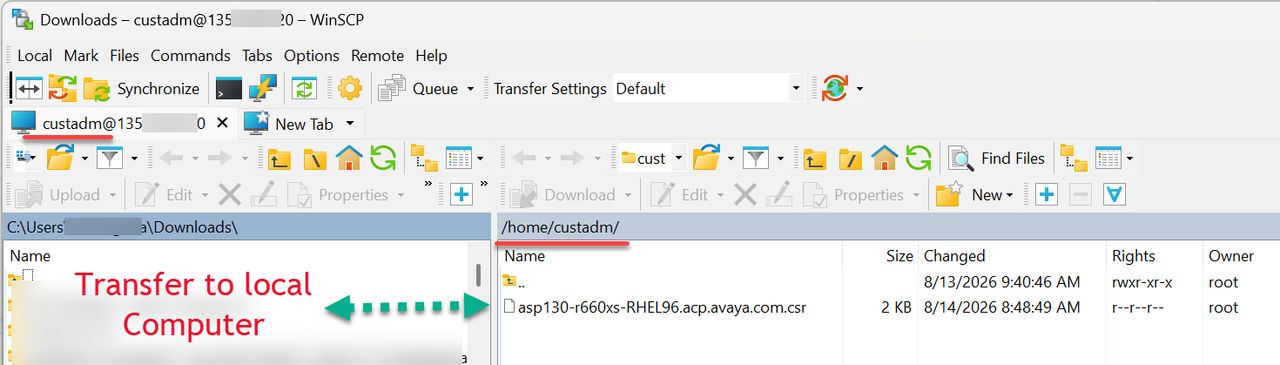
- Using WinSCP, re-connect to the RHEL 9.6 host and transfer the Certificate Signing Request file e.g. asp130-r660xs-RHEL96.acp.avaya.com.csr previously created to a local PC and submit it to the Certificate Authority of choice to have it signed.
ADDITIONAL INFORMATION:Note:The CSR file will be stored under /home/custadm/