

AVAYA DOCUMENTATION CENTER
Find answers to your technical questions and learn how to use our products
Avaya Aura® Communication Manager Reports
Analyzing the data
Before you begin
Before you record the data, review the day or week that you select to record data from and ensure that the following conditions are met:
The peak hour of the day is not the result of an abnormality. For example, caused by a snow storm. If you determine the peak hour is the result of an abnormality, ignore the data of that day.
The weeks must not be times of slack business activity.
The weeks must not be four consecutive weeks.
The weeks must be from two or more months of normal business activity.
About this task
Use the summary report to collect measurement data and calculate the measured Busy Hour Call Completions (BHCC).
Procedure
- Calculate the usage profile using the four-week average data that you obtained from your Worksheet 5.
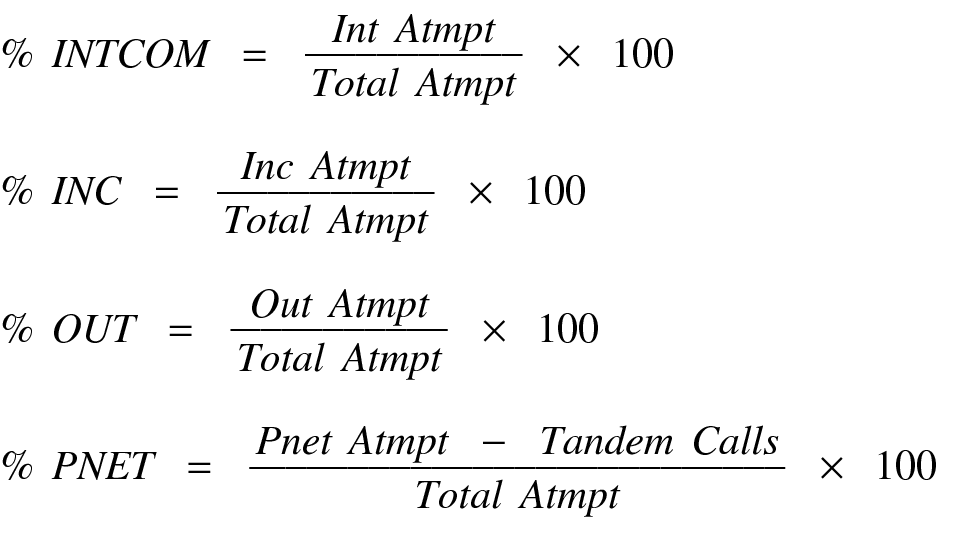
- Determine the normal calling rate for the given level of occupancy.
- Calculate the number of calls the configuration completes for a given level of occupancy. This number is referred to as Calls Predicted

The divisor, 70, is the constant from Step 3 and refers to the percentage of the processor used by call processing. The variable BHCC is the value you obtained in Step 6.
- Compare the value in the Calls Predicted field with the four-week average value in the Total Calls field on the worksheet.
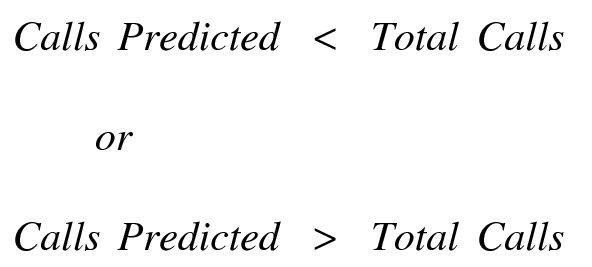
If Calls Predicted are less than Total Calls, then either you have a low feature usage rate or the system is completing more than 70 percent of calls. Therefore, if additional capacity is used in the same way, the following predictions should provide reliable results.
If Calls Predicted are greater than Total Calls, then either you have a high feature usage rate or the system is completing fewer than 70 percent of calls. Therefore, you must take care while deciding how many additional calls can be supported.
If Calls Predicted are equal or approximately equal to the Total Calls, then you are using the configuration in a typical manner.
- Calculate the number of calls the configuration completes for a given level of occupancy. This number is referred to as Calls Predicted
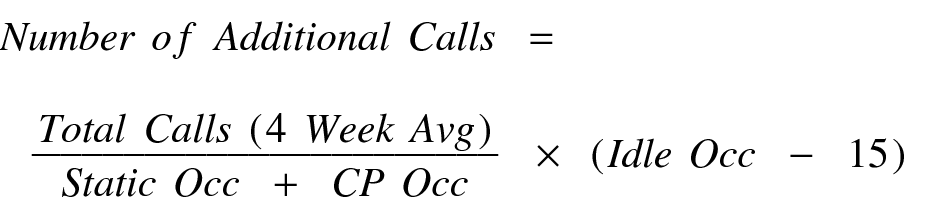
- Determine the number of additional calls the configuration can complete. Use the following equation to calculate the number of additional calls:
- Determine the number of additional extensions that can be added.
 Note:
Note:The Average Number of Calls per Extension depends on the traffic application and other customer-specific operating techniques. If you do not know this value, use the default value for General Business traffic application, 4.05.