AVAYA DOCUMENTATION CENTER
Find answers to your technical questions and learn how to use our products
Avaya Aura® Communication Manager Reports
CBC Trunk Group Measurements field descriptions
Name |
Description |
|---|---|
Queue Size |
Size of the queue for the ISDN-PRI CBC trunk group. If zero is displayed, then no queue is administered. Hence, the other queue measurements is also zero. If the queue is administered, then it serves all of the network services/features administered for the trunk group. However, its functional operation is somewhat different than the queue used with conventional trunk groups. When a particular service/feature uses its allotted maximum number of channels, then any additional call attempts are queued, even though not all of the trunks are currently in use. If the queue is already full, any additional call attempts simply overflow with the caller receiving reorder tone. Recommendations: Since one service/feature generally does not experience peak traffic the same time as another service/feature, there is an averaging effect. Furthermore, the queue size for a CBC trunk group need not be much larger than for a non-CBC trunk group. The Queue Size should be larger than the trunk group size; but, typically, not more than three times as large as the trunk group size. |
Calls Queued |
The total number of calls entered the CBC trunk group queue during the hour. |
Queue Overflow |
The total number of calls denied access to a trunk, found the queue full, and the caller received reorder tone. Suggested actions: Generally, this field displays the number 0. If this field indicates a high number, then the queue size may be too small, more trunks may be needed so fewer calls will queue, or the UAP may be too restrictive (for example, some of the |
Queue Abandonments |
The number of calls removed from the queue by either the system or the user. The system automatically removes calls from the queue after 30 minutes. A user may abandon that call by canceling the Automatic Callback feature (set earlier to place their call in the queue). Suggested action: Recall that a trunk group and its associated queues are sized to accommodate peak-hour traffic loads. Typically, this field indicates a small number. However, a large number generally indicates the queue size is too large and people are abandoning because they remained in queue for a long time. Consider adding more trunks so fewer calls queue. |
Out of Service |
The number of trunks in the trunk group out of service at the time the measurements are collected. An individual trunk may be taken out of service either automatically by the switch whenever an excessive number of errors occur, or by maintenance personnel to run diagnostic tests. Suggested action:If the trunks were removed from service by the switch, then the appropriate maintenance personnel should be notified. The objective is to keep all members of a trunk group in service. Generally, you should not make adjustments to the CBC trunk group because of Out of Service trunks, but should get those trunks returned to service. |
Usage Allocation Plan Used |
A list of the Usage Allocation Plan numbers followed by a list of the durations (in minutes) each plan was in effect during the measurement interval. The Number field can display up to a maximum of six plan numbers. A maximum of three different UAPs (identified by the numbers 1, 2, and 3) may be defined for each trunk group. All three plans are defined on Page 3 of the trunk group screen. Page 4 of the corresponding trunk group screen is where you administer plan assignments. |
Usage Allocation Plan Used (Contd) |
Each CBC trunk group is administered with either |
Service Feature |
The names of up to 10 services/features and the special identifier |
Min Chn |
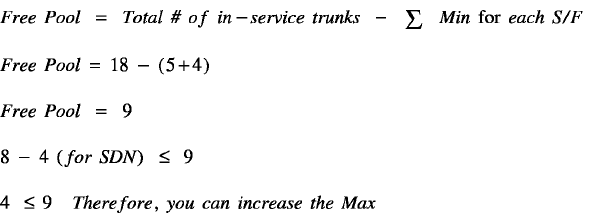
Minimum Number of Channels. The minimum number of channels in the ISDN-PRI CBC trunk group allocated to the specified service/feature at the time the measurements are collected. |
Max Chn |
Maximum Number of Channels. The maximum number of channels in the ISDN-PRI CBC trunk group allocated to the specified service or feature at the time the measurements are collected. |
Total Usage |
The sum of time, in hundred-call-seconds (CCS), for all channels used by the specified service/feature during the measurement interval. |
Total Seize |
Total Seizures. The total number of incoming and outgoing calls that requested the specified service/feature through the ISDN-PRI CBC trunk group. |
Inc. Seize |
Incoming Seizures. The total number of incoming calls that requested the specified service/feature through the ISDN-PRI CBC trunk group. For two-way and outgoing trunks, the number of Outgoing Seizures can be calculated as follows:  |
Tan Seize |
Tandem Seizures. The total number of trunk-to-trunk call seizures using this Service/Feature. |
Ovf TG |
Overflow Trunk Group. The number of outgoing calls that requested the specified service/feature, on the ISDN-PRI CBC trunk group, but are not carried because the calls arrived to find no idle trunk members available.
Note:
ted.
There are three overflow fields, each with a different priority. They are: overflow trunk group (Ovf TG) (priority 1), overflow maximum (Ovf Max) (priority 2), and overflow services/features (Ovf S/F) (priority 3). If more than one of the overflow conditions is met, only the field that represents the condition with the highest priority is incremen |
Ovf S/F |
Overflow Services/Features. The number of calls that requested the specified service/feature but denied because the calls arrived under the following conditions:
Suggested actions:
|
Ovf Max |
Overflow maximum. The number of calls not carried because the calls originated at a time when the service/feature already used-up its allotted maximum number of channels. In this case, the trunk group may still have trunk members available for the other services/features. Suggested actions:
|
% TBM |
Percentage of Trunks Below Minimum. The percentage of time during the polling interval that the number of channels in use by the specified service/feature is below the specified minimum.
Suggested action: Lower the Min Chnsince this may be the cause for the Ovf S/F.
Note:
If the % TBM field is high, then you are reserving more trunk members than will be used. Determine if another service/feature needs more trunks and, if so, lower the |
% ATB |
Percentage All Trunks Busy. The percentage of time (0 to 100%) during the measurement interval that the specified service/feature could not get a channel because of at least one of the following reasons:
Suggested actions:
Note:
If the ISDN-PRI CBC trunk group is administered to support wideband switching, the system displays the title WIDEBAND Support in the report title. |
% BLK |
Percentage Outgoing Blocking. The ratio of outgoing calls not carried for a specified service/feature to the outgoing calls offered by the service/feature. For an ISDN-PRI CBC trunk group without a queue, the calls not carried are those calls that find all facilities busy for the specified service/feature. For an ISDN-PRI CBC trunk group with a queue, the calls not carried are queue abandons plus those calls that find all facilities for the specified service/feature busy and cannot be queued because the queue is full. Suggested actions:
|