

AVAYA DOCUMENTATION CENTER
Find answers to your technical questions and learn how to use our products
Avaya Aura® Communication Manager Reports
Trunk Group Summary Report field descriptions
Name |
Description |
|---|---|
Peak Hour for All Trunk Groups |
The hour during the specified day with the largest total usage, when summed over all trunk groups. Peak hour and busy hour are synonymous. With conventional traffic theory data analysis, there are two methods for determining the peak hour. One is the time-coincident peak hour, meaning that hourly usage values are averaged across days for each hour of the day. The other is the bouncing peak hour, meaning that the highest usage is selected for each day without regard to the average across days. For the bouncing peak hour the highest load on a given day may or may not occur during the time-coincident busy hour. These traffic reports and accompanying trunk group data worksheet only use the bouncing peak hour method. Note that if the total usage for the current hour equals the total usage for the previous peak hour, then the peak hour is the hour with the greatest number of total seizures. |
Grp No. |
Group Number. A number that identifies each trunk group associated with the displayed data. Group numbers are displayed in numerical order, beginning with the lowest administered number and continuing to the highest administered number. |
Grp Siz |
Group Size. The number of administered trunks in the trunk group. |
Grp Type |
Group Type. The type of trunk in the trunk group. The system monitors/measures the following trunk types:
|
Grp Dir |
Trunk Group Direction. Identifies whether the trunk group is incoming (inc), outgoing (out), or two-way (two). |
Meas Hour |
Measurement Hour. The hour (using 24-hour clock) in which the measurements are taken. For the last-hour report, it is the last hour of measurement (each trunk group’s measurement hour is identical; but not necessarily the same as the indicated peak hour for the day). For the today-peak report, the measurement hour is the peak hour for each trunk group. Measurement hour for each trunk group can be different. For the yesterday-peak report, the measurement hour is the peak hour for each trunk group yesterday (each trunk group’s measurement hour can be different). |
|
Total Usage
|
Total usage (in CCS) for all trunks in the trunk group. Represents the total time the trunks are busy (with calls) during the one-hour measurement period. Total usage measures each time a trunk is seized for use by an incoming call (whether it is picked up or not) or an out going call (only after digits have been dialed). |
Total Seize |
The number of incoming and outgoing seizures carried on the trunk group. This includes the number of times a trunk in the group is seized, including false starts, don’t answer, and busy. |
Inc. Seize |
Incoming Seize. The number of incoming seizures carried on the trunk group. |
Grp Ovf |
Group Overflow. The number of calls offered to a trunk group not carried or queued (if a queue is present). Calls rejected for authorization reasons are not included. |
Que Siz |
Trunk Group Queue Size. A number (0 to 100) that identifies the number of slots assigned to the trunk group queue. This number represents how many calls may be held in queue by the trunk group. If 0 is displayed, then no queue is administered. Hence, the other queue measurements are also 0. Generally, the queue size should be larger than the trunk group size; however, not more than three times as large as the trunk group size. |
Call Qued |
Calls Queued. The total number of calls that entered the trunk group queue after finding all trunks busy. |
Que Ovf |
Queue Overflow. The total number of calls not queued because the queue is full. These calls receive a reorder signal. Suggested actions: Generally, this field indicates the number 0. If this field indicates a high number, then either the queue size may be too small, or add more trunks to reduce the number of calls queuing. |
Que Abd |
Queue Abandoned. The number of calls removed from the queue in one of the following manners:
Suggested action: Typically, this field indicates a small number. However, a large number generally indicates the queue size is too large and people are abandoning because they remained in queue for a long holding time and gave up. |
Out Srv |
Out of Service. The number of trunks in the trunk group out of service (listed as maintenance busy) at the time data is collected. An individual trunk may be taken out of service by the switch whenever an excessive number of errors occur, or by maintenance personnel to run diagnostic tests. Suggested action: If the trunks are removed from service by the switch, then the appropriate maintenance personnel should be notified. The objective is to keep all members of a trunk group |
% ATB |
Percentage All Trunks Busy. The percentage of time all trunks in the trunk group were simultaneously in use during the measurement interval.
Note:
In use means the trunks are busy — either serving calls or because they are busied-out by maintenance. Suggested actions:
|
% Out Blk |
Percentage Outgoing Blocking. The percentage of offered calls not carried on the trunk group. It does not include unauthorized calls denied service on the trunk group (due to restrictions) or calls carried on the trunk group but do not successfully complete at the far end (that is, where there is no answer). For trunk groups without a queue, the calls not carried are those calls that arrive when all trunks are busy. The number of Outgoing Seizures is calculated as follows:  Similarly, the equation for calculating Outgoing Calls Offered is as follows: 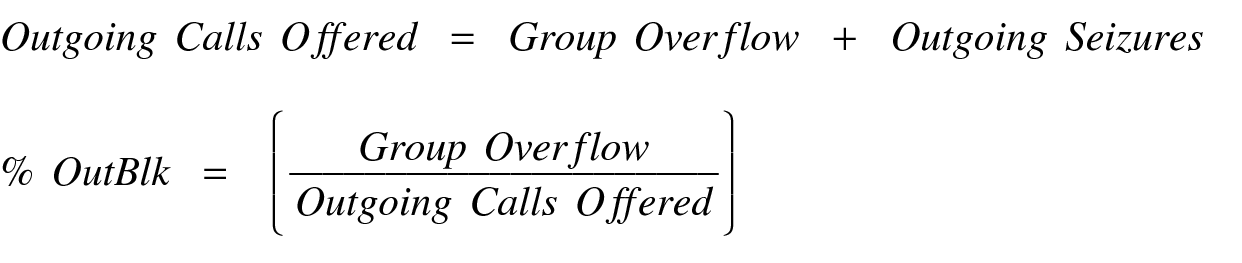 For trunk groups with a queue, the calls not carried are those calls that arrive when all trunks are busy and the queue is full (Queue Overflow) and calls removed from queue before being carried (Queue Abandoned). For this scenario, the Percentage Outgoing Blocking is calculated as follows: 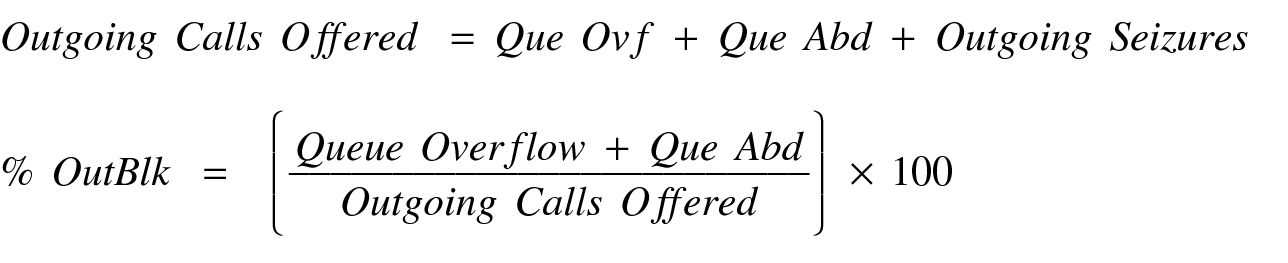 Suggested actions:
|
Wideband Flag |
If the trunk group supports wideband (n X DS0) switching, the system displays a |
1
The usage that wideband calls contribute to this measurement is proportional to the resources the calls consume. For example, a 384-kbps call contributes six times more to the total usage than does a 64-kbps call.