DOCSHUB DOCSHUB
  • Library
  • Avaya Support Site Avaya Learning Blogs Videos & Podcasts Knowledge base Report Product bugs
Deutsch English Español (México) Français Français (Canada) Italiano Magyar Nederlands Português (Brasil) Русский עברית العربية 中文(简体) 中文(繁體) 日本語 한국어
Login
DOCSHUB DOCSHUB
  • Library
  • Avaya Support Site Avaya Learning Blogs Videos & Podcasts Knowledge base Report Product bugs
  • Deutsch English Español (México) Français Français (Canada) Italiano Magyar Nederlands Português (Brasil) Русский עברית العربية 中文(简体) 中文(繁體) 日本語 한국어
Login

Avaya Aura® Communication Manager Reports

Table of Contents

Type to filter navigation items by title
  • Legal
  • Introduction
    • Purpose
    • Changes to platform support
    • Discontinued support for IP Server Interface (TN2312, commonly known as “IPSI”)
    • Intended audience
    • Change history
  • About Commands and displaying reports
    • Overview
    • Commands and the command line format
    • Types of commands
    • Traffic measurement commands
    • Printing reports
    • Sample list measurements report screen
  • System Printer Reports Scheduler feature
    • System printer
      • System printer parameters field descriptions
    • Operation and maintenance of the system printer data link
    • Report Scheduler
      • Print intervals
      • Adding a report to the report scheduler
      • Printing reports on the system printer
      • Listing scheduled reports
      • Changing the schedule of a report
      • Removing a report from the report scheduler
      • Report Scheduler field descriptions
  • Traffic data analysis reports
    • Overview
    • Standard traffic data analysis report fields
      • Switch name
      • Time and date
      • Measurement hour
      • About changing the time
      • Measurement data updates
    • Attendant group reports
      • Attendant Group Measurements report
        • Displaying the Attendant Group Measurements report
        • Attendant Group Measurements field descriptions
      • Attendant Positions Measurements report
        • Displaying the Attendant Positions Measurements report
        • Attendant Positions Measurements field descriptions
      • Attendant Speed of Answer report
        • Displaying the Attendant Speed of Answer report
        • Sample Attendant Speed of Answer screen
          • Attendant Speed of Answer field descriptions
        • Data analysis guidelines for attendant group reports
        • Analysis of the attendant group data
          • Average work time
          • Staffed time
          • Attendant offered load
          • Percent occupancy
          • Percent of calls queued
          • About customer-supplied (theoretical) data for measurement reports
    • Automatic circuit assurance reports
      • ACA Parameters report
        • Displaying the ACA Parameters report
        • ACA Parameters field descriptions
      • Automatic Circuit Assurance Measurements report
        • Displaying the Automatic Circuit Assurance Measurements report
        • Automatic Circuit Assurance Measurements field descriptions
    • Route pattern reports
      • Route Pattern Measurement Selection report
        • Displaying the list of route patterns to be measured
        • Changing the list of route patterns to be measured
        • Route Pattern Measurement Selection field descriptions
      • Route Pattern Measurements report
        • Displaying the Route Pattern Measurements report
        • Route Pattern Measurement field descriptions
        • Data analysis guidelines for Route Pattern reports
        • Route pattern data analysis
    • Call Type Analysis Route Chosen report
      • Displaying the Call Type Analysis Route Chosen report
      • Call Type Analysis Route Chosen field descriptions
    • AAR or ARS Route Chosen report
      • Displaying an AAR Route Chosen report
      • AAR Route Chosen report field descriptions
      • Displaying an ARS Route Chosen report
      • ARS Route Chosen report field descriptions
    • Call Rate Measurements report
      • Displaying the Call Rate Measurements report
      • Call Rate Measurements field descriptions
    • Call Summary Measurements report
      • Displaying the Call Summary Measurements report
      • Call Summary Measurements field descriptions
    • Call coverage measurements reports
      • Call Coverage Measurement report feature interactions
      • Data analysis guidelines for call coverage measurements
      • Selecting coverage paths to be measured
        • Displaying the list of coverage paths to be measured
        • Coverage Path Measurements field descriptions
      • Coverage Path Measurements report
        • Displaying the Coverage Path Measurements report
        • Coverage Path Measurements field descriptions
      • Selecting principal extensions to be measured
        • Displaying the list of principal extensions to be measured
        • Changing the list of principal extensions to be measured
        • Measured Principals selection field descriptions
      • Principal Measurements report
        • Displaying the Principal Measurements report
        • Principal Measurements field descriptions
    • DS1 link performance measurements
      • DS1 Link Performance Measurements Summary report
        • Displaying the DS1 Link Performance Measurements Summary report
        • DS1 Link Performance Measurements Summary Report field descriptions
      • DS1 Link Performance Measurements Detailed Log report
        • Displaying the DS1 Link Performance Measurements Detailed Log report
        • DS1 Link Performance Measurements Detailed Log field descriptions
    • DS1 facility performance measurements
      • Clearing the DS1 Converter facility measurements
      • DS1 Facility Link Performance Measurements field descriptions
    • Emergency Access Calls report
      • Displaying the Emergency Access Calls report
      • Emergency Access Calls field descriptions
    • Hunt group reports
      • Hunt Groups report
        • Displaying the Hunt Groups report
        • Hunt Groups field descriptions
      • Hunt Group Members report
        • Displaying the Hunt Group Members report
        • Hunt Group Members field descriptions
      • Hunt Group Measurements report
        • Displaying the Hunt Group Measurements report
        • Hunt Group Measurements field descriptions
        • Data analysis guidelines for hunt group reports
        • Hunt group measurement data analysis
          • Important considerations for the ACD and non-ACD hunt groups
          • Differences between non-ACD and ACD hunt groups
        • Total usage
        • Average holding time
      • Hunt Group Performance report
        • Displaying the Hunt Group Performance report
        • Hunt Group Performance field descriptions
      • Hunt Group Status report
        • Displaying the Hunt Group Status report
        • Hunt Group Status field descriptions
    • IP Signaling Groups Latency and Loss report
      • Displaying the IP Signaling Groups Latency and Loss report
      • IP Signaling Groups Latency and Loss Report field descriptions
    • IP traffic measurements reports
      • IP Codec Resource Hourly report
        • Displaying the IP Codec Resource Hourly report
        • IP Codec Resource Hourly field descriptions
      • IP Codec Resource Summary report
        • Displaying the IP Codec Resource Summary report
        • IP Codec Resource Summary field descriptions
      • IP Codec Resource Detail report
        • Displaying the IP Codec Resource Detail report
        • IP Codec Resource Detail field descriptions
      • IP DSP Resource Hourly report
        • Displaying the IP DSP Resource Hourly report
        • IP DSP Resource Hourly Report field descriptions
      • IP DSP Resource Summary report
        • Displaying the IP DSP Resource Summary report
        • IP DSP Resource Summary Report field descriptions
      • IP DSP Resource Detail report
        • Displaying the IP DSP Resource Detail report
        • IP DSP Resource Detail Report field descriptions
    • H.248 Gateway DSP Resource reports
      • IP DSP Resource H.248 GW Summary report
      • Displaying the IP DSP Resource H.248 GW Summary report
      • IP DSP Resource H.248 GW Summary Report field descriptions
      • IP DSP Resource H.248 GW Hourly report
      • Displaying the IP DSP Resource H.248 GW Hourly report
      • IP DSP Resource H.248 GW Hourly Report field descriptions
    • LAR Measurements for Preferences in Pattern report
      • Displaying the LAR Measurements for Preferences in Pattern report
      • LAR Measurements for Preferences in Pattern field descriptions
    • Modem Pool Measurements report
      • Displaying the Modem Pool Measurements report
      • Modem Pool Measurements field descriptions
    • Multimedia reports
      • ESM reports
        • Displaying the ESM Hourly report or the ESM Summary report
        • ESM Hourly report and ESM Summary report field descriptions
      • MMI reports
        • Displaying the MMI Hourly report or the MMI Summary report
        • MMI Hourly report and MMI Summary report field descriptions
      • Voice Conditioners report
        • Displaying the VC Hourly report or the VC Summary report
        • VC Hourly report and VC Summary report field descriptions
    • Performance Summary report
      • Displaying the Performance Summary report
      • Performance Summary report field descriptions
    • Attendant and Maintenance Status report
      • Displaying the desired system status report
      • Maintenance Status and Attendant Status field descriptions
    • Abbreviated Dialing report
      • Displaying the Abbreviated Dialing report
      • Abbreviated Dialing Lists OR Abbreviated Dialing Personal Lists field descriptions
    • Traffic Summary report
      • Displaying the Traffic Summary report
      • Measurements Summary Report field descriptions
    • Trunk group reports
      • Trunk Group Summary report
        • Displaying the Trunk Group Summary report
        • Trunk Group Summary Report field descriptions
      • Trunk Group Hourly report
        • Displaying the Trunk Group Hourly report
        • Trunk Group Hourly Report field descriptions
      • Specifying trunks to monitor for Trunk Group Hourly report
        • Displaying the Trunk Group Measurement Selection screen
        • Changing the Trunk Group Measurement Selection screen
        • Trunk Group Measurement Selection field descriptions
      • Highest Hourly Trunk Group Blocking Performance report
        • Displaying the Highest Hourly Trunk Group Blocking Performance
        • Highest Hourly Trunk Group Blocking Performance Report field descriptions
      • Trunk Out of Service report
        • Displaying the Trunk Out of Service report
        • Trunk Out of Service Report field descriptions
      • Trunk Group Status report
        • Displaying the Trunk Group Status report
        • Trunk Group Status Report field descriptions
        • Data analysis guidelines for trunk group reports
        • Analyzing trunk group data
          • Determining Average Holding Time
          • Determining Trunk Group Blockage
          • Determining the number of trunks required for a specified Grade of Service
      • CBC Trunk Group Measurements report
        • Displaying the Trunk Group CBC Measurements Report
        • CBC Trunk Group Measurements field descriptions
        • Background information for CBC Trunk Group Measurements report
    • Trunk Lightly Used report
      • Displaying the Trunk Lightly Used report
      • Trunk Lightly Used field descriptions
    • Voice Announcement Measurements report
      • list measurements announcement command
      • Voice Announcement Measurements Report field descriptions
    • Wideband trunk groups reports
      • Wideband Trunk Group Summary report
        • Displaying the Wideband Trunk Group Summary report
        • Wideband Trunk Summary Report field descriptions
      • Wideband Trunk Group Hourly report
        • Displaying the Wideband Trunk Group Hourly report
        • Wideband Trunk Group Hourly field descriptions
    • Wideband Trunk Group Measurement Selection
      • Configuring Wideband Trunk Group Measurement Selection
      • Wideband Trunk Group Measurement Selection field descriptions
      • Data analysis guidelines for trunk groups
      • Summary report
      • Hourly report
      • Performance considerations
  • Processor occupancy reports
    • About processor occupancy reports
      • Processor occupancy reports
    • Vector suspension during system overload
    • Summary command
    • Occupancy Summary Measurements report
      • Displaying the processor Occupancy Summary Measurements report
      • Occupancy Summary Measurements field descriptions
    • Last-hour command
    • Occupancy Last-Hour Measurements report
      • Displaying the Occupancy Last-Hour Measurements report
      • Occupancy Last-Hour Measurements field descriptions
      • Using the last-hour report to resolve problems
    • Busiest-interval command
    • Occupancy Busiest 3-Minute-Intervals Measurements report
      • Displaying the Occupancy Busiest 3-Minute Intervals Measurements report
      • Occupancy Busiest 3-Minute Intervals Measurements field descriptions
      • Using the busiest-interval report to resolve problems
    • Communications links command
    • Communication Link Measurements report
      • Displaying the processor occupancy Communication Link Measurements report
      • Communication Link Measurements field descriptions
    • Mapping links to applications
      • Displaying the applications running on the links
      • Interface Links field descriptions
      • Data analysis guidelines
      • Analyzing the data
  • Security violations reports
    • Security Violations Summary report
      • Displaying the summary report
      • Reset all counters of the Security Violations Summary report
      • Security Violations Summary field descriptions
    • Security violations status reports
      • Security Violations Status - Remote Access Barrier Code Violations field descriptions
      • Security Violations Status - Authorization Code Violations field descriptions
      • Security Violations Status - Station Security Code Violations field descriptions
  • History reports
    • Data commands
    • History report
      • Parsing capabilities for the History report
      • Displaying the History report
      • History field descriptions
    • Enhanced Access Security Gateway
    • Malicious Call Trace History report
      • Displaying the Malicious Call Trace History report
      • Malicious Call Trace History field descriptions
  • Blank Worksheets
    • Worksheets
      • Attendant Group Data worksheet
      • ARS/AAR Routing Pattern Data worksheet
      • Hunt Group Data worksheet
      • Trunk Group Data worksheet
      • Wideband Trunk Group Data worksheet
      • Processor Occupancy Summary Data worksheet
  • Resources
    • Communication Manager documentation
      • Finding documents on the Avaya Support website
      • Accessing the port matrix document
      • Avaya Documentation Center navigation
    • Training
    • Viewing Avaya Mentor videos
    • Support
      • Using the Avaya InSite Knowledge Base
Home
Avaya Aura® Communication Manager Reports
Attendant group reports
Attendant Speed of Answer report
Sample Attendant Speed of Answer screen

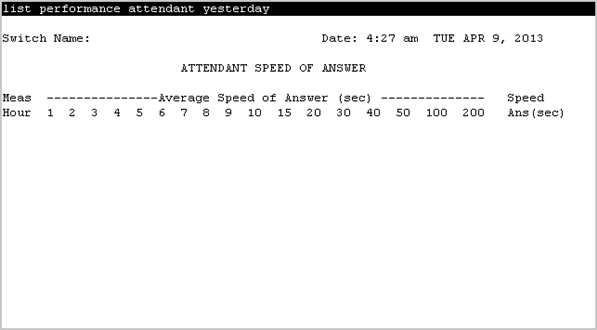
Sample Attendant Speed of Answer screen

Share this page

  • On LinkedIn
  • On X
  • On Email

PDF Export Options

  • This Topic
  • Entire Document
Last Updated : May 06, 2013 |
Communication Manager
Reference Configuration
10.2.x
Illustrates the Attendant speed of answer screen.
Related information
Attendant Speed of Answer report
Attendant Speed of Answer field descriptions
Send Feedback

Topic navigation

Previous Topic

Displaying the Attendant Speed of Answer report

Next Topic

Attendant Speed of Answer field descriptions

In this article

STAY CONNECTED

Twitter Youtube Linkedin
Footer Icon
  • Sitemap
  • Terms of use
  • Privacy
  • Cookie Policy
  • Trademarks
  • Accessibility
© 2026 Avaya LLC