

AVAYA DOCUMENTATION CENTER
Find answers to your technical questions and learn how to use our products
IP Office Voicemail Pro Example Exercises
Add a Home Action to Restart the Call Flow
Callers to the auto-attendant may want to hear the list of options again. We can do this by adding a  Home action which will return them to the start of the callflow.
Home action which will return them to the start of the callflow.
The following is an image of a completed call flow:
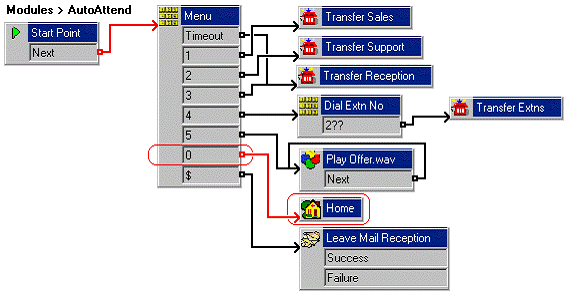
The red arrow or arrows in the call flow are the changes added in this section.
- Do the following to add a new option to the Menu:
- Select the AutoAttend module.
- Open Properties for the
 Menu action.
 - In the Touch Tones tab, select 0.
- Click OK.
- Do the following to add a new Home:
- Click the
 Basic Actions icon and select Home.
 - Click the Details pane to place the action.
- Click the
- Do the following to add connections:
- Click
 Connection.
 - Set 0 to the action Home.
- Click
- Select Close and OK.
- Click the
 Save & Make Live icon.
 - The auto-attendant greeting needs to be re-recorded to include the new options. For example: "Welcome to Avaya. Please press 1 for Sales, 2 for Support, 3 for Reception, 4 to dial the extension you want, or 5 to hear the latest sales offer. Alternatively, hold for further assistance or press 0 to listen to the options again. Thank you." This can be done using the callflow and short code (*80) created earlier.
- Do the following to test the new menu item:
- To make a test call to the auto-attendant module, dial *90.
- Dial 0 to listen to the options again.