

AVAYA DOCUMENTATION CENTER
Find answers to your technical questions and learn how to use our products
IP Office Voicemail Pro Example Exercises
Adding a Number Unavailable Prompt
You can use the Home action to simplify the connections in the call flow and play a wav file to users when an extension they want is busy or not answered.
The following is an image of a completed call flow:
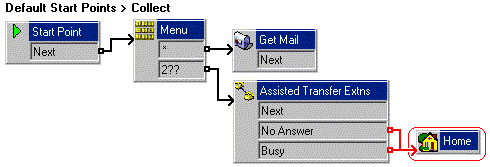
The red arrow or arrows in the call flow are the changes added in this section.
- In the Recording module, add a new touch-tone and using the Edit Play List action allows you to record unavailable.wav with a message. For example:
Sorry, that extension is currently unavailable. Please make another choice.
- In , delete the connections to the Menu action from the No Answer and Busy results.
- Add a Home action and open its properties.
- In the Entry Prompts tab, add unavailable.wav file.
- Click Close and then OK.
- Connect the No Answer and Busy results to the Home action.
- Click the
 Save & Make Live icon.
 - Do the following to test call flow:
- Make 208 busy.
- On another extension, dial *17 and dial 208 when prompted. As this extension is busy, you hear unavailable.wav and then are returned to the Menu action.