

AVAYA DOCUMENTATION CENTER
Find answers to your technical questions and learn how to use our products
IP Office Voicemail Pro Example Exercises
Add the Sales Group Attendant
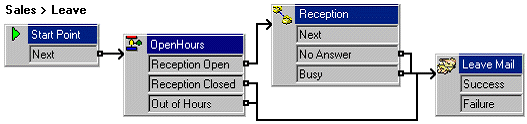
In this exercise we will create a callflow for callers leaving a message for the Sales group. It reuses the same module for business hours are used by the main auto-attendant.
The following is an image of a completed call flow:
- Under Specific Start Points, right-click Groups and select Add.
- Use the drop-down list to select Sales.
- Check Leave and then select OK.
- Click the Leave start point now under Sales.
- From the list of Modules, click and drag OpenHours into the call flow.
- From Telephony Actions, add an Assisted Transfer and open its properties.
- In the General tab, change the Token Name to Reception.
- In the Entry Prompts tab, add a "Transferring you to reception" prompt.
- In the Specific tab, set the Mailbox to Reception.
- Set the Source of transfer to Sales Busy and click OK.
- Connect the modules as shown in the image above.
- From Mailbox Actions, add a Leave Mail action and open its properties.
- In the Specific tab, set the Mailbox to Sales.
- Click the
 Save & Make Live icon.