

AVAYA DOCUMENTATION CENTER
Find answers to your technical questions and learn how to use our products
IP Office Voicemail Pro Example Exercises
Creating Modules to Alter the Variables Value
In this example, we will create two new modules.
-
One for setting the value of the Reception variable's value to open.
-
The other for setting the value of the Reception variable's value to closed.
The following is an image of a completed call flow:
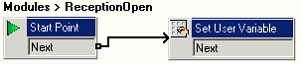
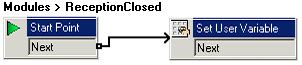
- Click
 Modules and add a module called ReceptionOpen.
 - Add a Set User Variable action to the module.
- Click Conditions Actions, click
 Set User Variable action.
 - Click the Details pane to place the action.
- Open Properties for the new Set User Variable action.
- In the Entry Prompts tab, click
 Add a Prompt icon. Add a prompt such as
 Reception is open.
- Click the Specific tab.
- Click Assign the following user variable to select Reception.
- In the with the following value field, type open.
- Click OK.
- Click Conditions Actions, click
- Connect the Start Point to the Set User Variable action.
- Repeat the steps above to create another module called ReceptionClosed. Use it to set the value of the Reception variable to closed with a prompt such as Reception is closed.
- Click the
 Save & Make Live icon.
Next steps
-
Having adding the modules, we can now add short codes to trigger them. Go to Adding Short Codes to Change the Variable Value.