

AVAYA DOCUMENTATION CENTER
Find answers to your technical questions and learn how to use our products
IP Office Voicemail Pro Example Exercises
Adding the Module
Having created a module to check whether the business and reception are open (see Creating the Module for Reuse), we can now add it to the example auto-attendant.
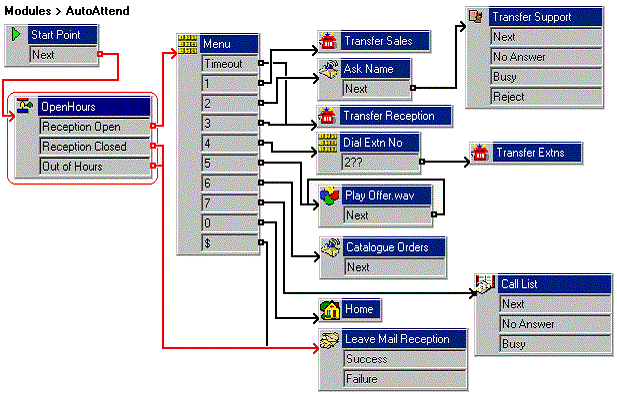
The following is an image of a completed call flow:
- In Voicemail, open the AutoAttend module.
- Delete the existing Test Condition and Test User Variable actions.
- Click and drag OpenHours module from the list of modules into the AutoAttend module.
- Click
 Connection.
- Connect the Start Point to the OpenHours module
- Connect the Reception Open result to the Menu action.
- Connect the Reception Closed and Out of Hours results to Leave Mail Reception.
- Click the
 Save & Make Live icon.