

AVAYA DOCUMENTATION CENTER
Find answers to your technical questions and learn how to use our products
IP Office Voicemail Pro Example Exercises
Adding the Out of Hours Service
Having added the condition test for when the auto-attendant menu should be available, we need to add an action that should be applied to calls outside those times. Otherwise, calls will just be disconnected.
For our example, we will allow caller's outside business hours to leave a message.
The following is an image of a completed call flow:
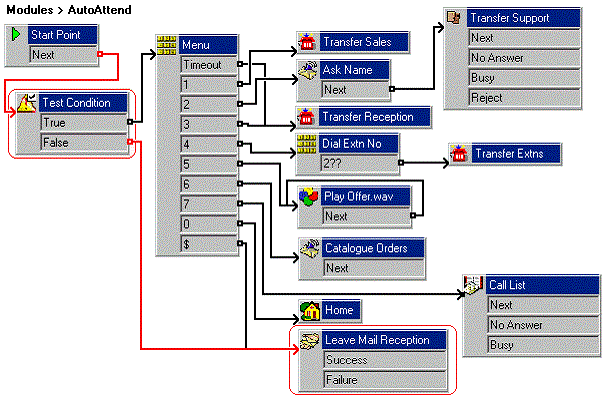
The red arrow or arrows in the call flow are the changes added in this section.
- Do the following to transfer the calls during out of hours to reception voicemail:
- Click
 Connection.
 - Connect to False under the Test Condition action to the Leave Mail Reception action.
- Click
- Do the following to test the out-of-hours call route by changing AutoAttend to End time:
- Click the
 Conditions Editor icon.
 - In the Attendant condition, double-click
 Week Planner.
 - For the current day, change the End time to a time already past.
- Click OK.
- Click the
- Click the
 Save & Make Live icon.
 - Do the following to test the condition:
- To test the new announcement, dial *90 and make a test call to the auto-attendant.
- When prompted to leave a message, end the call.
- Do the following to change the End time back to 18:00:
- Click the Conditions Editor icon.
- In the Attendant condition, double-click Week Planner.
- For the current day, change the End time to 18:00.
- Click OK.
- Click the
- Click the Save & Make Live icon.