

AVAYA DOCUMENTATION CENTER
Find answers to your technical questions and learn how to use our products
IP Office Voicemail Pro Example Exercises
Amending the Recordings Module
You can create and add an action that goes to the NameWavs table for recording individual mailbox names.
The following is an image of a completed call flow:
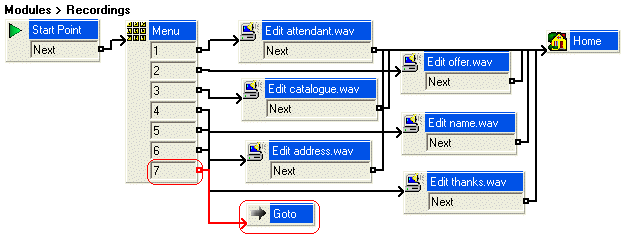
The red arrow or arrows in the call flow are the changes added in this section.
- To add a new option to the Menu do the following:
- Select the module AutoAttend.
- Open properties for the Menu action.
- In the Touch Tones tab, click 7 and click OK.
- To add a Goto action, do the following:
- Click the Basic Actions icon, select Goto.
- Click the Details pane to place the action.
- Right-click the Goto action and select Properties.
- Click the Specific tab.
- In Please select a node to go to type NameWavsTable.
STEP RESULT:You can record mailbox names without going into individual mailboxes.
- Click OK.
- Click
 Connection.
- Connect 7 to the Goto action.
- Click the
 Save & Make Live icon.