

AVAYA DOCUMENTATION CENTER
Find answers to your technical questions and learn how to use our products
IP Office Voicemail Pro Example Exercises
Setting Up the Callback Call Flow
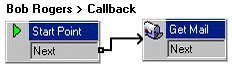
The following is an image of a completed call flow:
- Under Specific Start Points, right-click
 Users and select Add.
 - In Name, enter Bob Rogers.
- Select the Callback entry point and select OK.
- Within Bob Rogers, select Callback.
- Add a Get Mail action and under the Specific tab, in Mailbox enter his username or extension.
- Connect the Start Point and the Get Mail action.
- Click the
 Save & Make Live icon.