

AVAYA DOCUMENTATION CENTER
Find answers to your technical questions and learn how to use our products
IP Office Voicemail Pro Example Exercises
Using the Variable in the Call Flow
Having defined a user variable (see Creating a New Variable), we now also have modules to set the current value of a variable and short codes to trigger those modules. We can now use its current value to control operation of our auto-attendant.
The following is an image of a completed call flow:
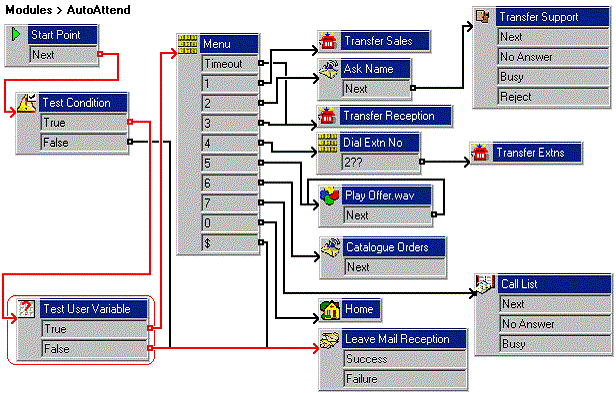
The red arrow or arrows in the call flow are the changes added in this section.
- In the AutoAttend module, delete the current connection from the Test Condition action's True result..
- Add a Test User Variable action.
- Click Conditions Actions, select
 Test User Variable.
 - Click the Details pane to place the action.
- Open the Properties for the new Test User Variable.
- In the Specific tab, from the This action will return TRUE if the following variable list box, select Reception.
- In matches the value below, type open.
- Click OK.
- Click Conditions Actions, select
- Connect the new action into the callflow:
- Click
 Connection.
 - Connect the Test Condition action's True result to the Test User Variable action.
- Connect the Test User Variable action's True result to the Menu action.
- Connect the Test User Variable action's False result to the Leave Mail Reception action.
- Click
- Click the
 Save & Make Live icon.
 - From any extension, dial *91 to set the reception variable to Open.
- Make a test call to the auto-attendant module. The attendant.wav is played.
- From any extension, dial *92 to set the reception variable to Close.
- Make a test call to the auto-attendant module. A message Leave a message for reception is played.
- From any extension, dial *91 to return the reception variable to Open.