

AVAYA DOCUMENTATION CENTER
Find answers to your technical questions and learn how to use our products
IP Office Voicemail Pro Example Exercises
Using the Clock Action
Through this exercise, you can add a new module to give users the time from the Voicemail Server PC.
The following is an image of a completed call flow:
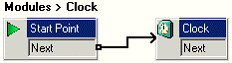
- Add a new Modules called Clock.
- From Miscellaneous Actions, add a Clock action to the module.
- Connect the Start Point and the Clock action.
- Click the
 Save & Make Live icon.
 - In IP Office Manager, add the following short codes:
- In Code, enter 123.
- In Feature, enter Voicemail Collect.
- In Telephone Number, enter Clock.
- In Line Group ID, enter 0.
- Save and merge the configuration with the telephone system.
- Dial 123 on any extension. The time according to the voicemail server is provided.