

AVAYA DOCUMENTATION CENTER
Find answers to your technical questions and learn how to use our products
IP Office Voicemail Pro Example Exercises
Creating a Personal Attendant for a User
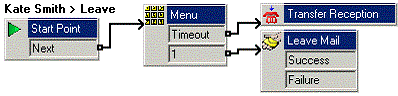
You can add a User Start Point for callers leaving a voicemail for Kate Smith (extension 208). To this call flow, you can add a menu of options for callers.
This user Specific Start Points action precedes any call flow in the default Leave start point and standard voicemail.
The following is an image of a completed call flow:
- Under
 Specific Start Points, right-click Users and select Add.
 - In the Name, enter Kate Smith.
- Select the Leave entry point and click OK.
- Click Leave now shown under Kate Smith.
- Create a recording for the Menu action.
ADDITIONAL INFORMATION:Create a recording and a call flow that allows a caller to choose whether to leave a message, transfer to Bob Rogers (207), transfer to the Sales group (301), or hold to be transferred to Reception (300).Note:You cannot use the usual mailbox greeting, as the Leave Mail action uses that action.
- Click the
 Save & Make Live icon.
Result
From an extension other than 207 or 208, dialing 208, after not being answered the call announcement is heard as per the recording in Menu action and the call is transferred to Kate Smiths voicemail.