

AVAYA DOCUMENTATION CENTER
Find answers to your technical questions and learn how to use our products
IP Office Voicemail Pro Example Exercises
Adding a Menu Timeout
You can add a Timeout option to the Menu to transfer callers to Reception through this exercise. When a caller does not make a Touch Tones selection, they are transferred to the Reception group.
The following is an image of a completed call flow:
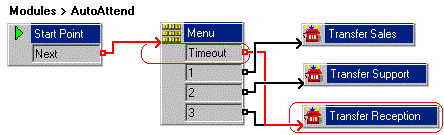
The red arrow or arrows in the call flow are the changes added in this section.
- Do the following to add the Timeout option to the Menu action:
- Select the AutoAttend module.
- Open Properties for the
 Menu action.
 - Select the Touch Tones tab.
- Select the option Wait for a key press for up to and enter 8.
- Select OK. The Menu action has a Timeout result.
- Connect the Timeout result to
 Transfer Reception.
 - Click the
 Save & Make Live icon.
 - Click Yes to make the changes permanent.
- To test the new menu item, from any extension other than 207, make a test call to the auto-attendant module by dialing *90. After eight seconds, the call is transferred to extension 207.
Next steps
-
We will now look at using wildcards in our auto-attendant's Menu action. Go to Adding a ? Wild Card in a Menu.