

AVAYA DOCUMENTATION CENTER
Find answers to your technical questions and learn how to use our products
IP Office Voicemail Pro Example Exercises
Adding a Post Dial Action
The Post Dial action can be used to play the actions in a Voicemail Pro start point to a different extension than the one triggering the process.
You can create a short code that allows the Reception to play the Clock module previously created to another extension. This is just an example of how post dial can be used to launch a chosen call flow start point at another extension (we could have used a Menu action to let the receptionist indicate the extension).
The following is an image of a completed call flow:
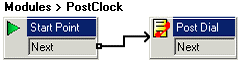
- Add a new Modules called PostClock.
- From Miscellaneous Actions, add a Post Dial action and open its properties.
- In the Specific tab, in Post the following action or wav file, click
 .
. - Select Start Point or module and select the Clock module created previously.
- Click OK.
- In to extension, enter 207 and select OK.
- In the Specific tab, in Post the following action or wav file, click
- Connect the Start Point to the Post Dial action.
- Click the
 Save & Make Live icon.
 - In IP Office Manager, add the following short codes:
- In Code, enter *98.
- In Feature, enter Voicemail Collect.
- In Telephone Number, enter Post Clock.
- In Line Group ID, enter 0.
- The Post Dial action can also be used to play a wav file to the target extension.
For example, to play the file c:\file\mymusic.wav, in the Specific tab, you can to play the .wav file in a continuous loop and delete the .wav file after completion.