

AVAYA DOCUMENTATION CENTER
Find answers to your technical questions and learn how to use our products
Avaya Device Adapter User Guide for Avaya Aura® Call Center Elite Agents
Incoming call display
The phone screen displays information of an incoming call depending on the services that are configured for the phone by the system administrator.
The icons indicating various functions, such as work modes and incoming calls, may differ on different phones. For more information, see About keys and buttons on a call center phone.
The icon next to the work mode button indicates the agent work mode. The icon next to the active call appearance button indicates the state of the call on that button.
Incoming call display for an ACD call (VDN information display)
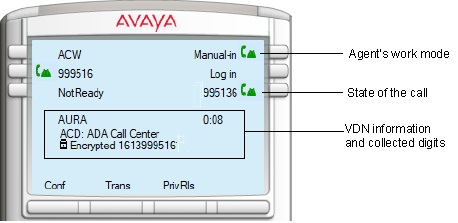
When new incoming ACD call arrives, the first line after the programmable feature keys on the phone displays the VDN or the VDN name depending on the configuration.
The display screen also provides the prefix ACD to indicate that the call is being routed by this VDN. The second line of the display after the VDN information provides the caller’s telephone number. If the call uses secure media, the caller’s telephone number is displayed next to a padlock with the label Encrypted. But, if the telephone number contains more than 12 digits, the label Encrypted is not displayed, instead the telephone number is truncated to a maximum of 22 digits and displayed along with the padlock.
The maximum length for the VDN or VDN name is 18 characters.
In addition, the following information is displayed during an ACD call:
-
Digits provided by the caller during the ACD call:The third line displays the digits that the caller provides during the call. For example, date of birth. A caller can provide a maximum of up to 16 digits.The default label to display the collected digits is Digits.Note:The collected digits are displayed on the agent’s phone only if this feature is enabled for the agent’s phone in Call Center Elite.
-
UUI information:If the system administrator has configured the UUI Info button for the phone, then irrespective of the login status and call state of the agent, the UUI Info button is available on the phone screen. The system administrator must also set the appropriate Class of Restriction (COR) to enable the display of User-to-User (UUI) information on the phone.If you press the UUI Info button when not on an active ACD call, no information is displayed.If you press the UUI Info button during an active ACD call, the following UUI information is displayed on phone screen:Screen 1Screen 2Line 1InVDNTime:<fixed size of maximum 4 digits> UCID:<First 2 digits of UCID>InVDNTime provides the duration of time, in seconds, the call was in the VDN queue.<22 symbols of ASAI>Line 2<Remaining 18 digits of UCID> ASAI:<22 symbols of ASAI>Line 3<First 22 symbols of ASAI><22 symbols of ASAI>If no UUI information is present and if you press the UUI Info button, then the following message is displayed:UUI unavailableIf the call is encrypted and if the UUI information contains less than 13 characters, then Encrypted is displayed along with the UUI information.For more information, see Viewing user-to-user information during an active call.
Incoming call display for a DAC call
When an incoming call is a Direct Agent Call (DAC) call, then the first line of the display indicates the name of the caller, with the prefix DAC. DAC indicates that the call is a Direct Agent Call targeted for the specific agent. The second line of the display provides the telephone number of the caller.
Incoming call display for a station extension call
When an incoming call is destined to the station’s extension, neither ACD or DAC prefixes are provided. The first line displays the name of the caller, and the second line displays the telephone number of the caller.