

AVAYA DOCUMENTATION CENTER
Find answers to your technical questions and learn how to use our products
Deploying Avaya Wireless DECT with IP Office
Mounting a Base Station using a Wallmount
Remove the mounting bracket from the base station. Use it as a template for marking the screw fixing holes. Note the diagram below indicating the required clearance for attaching the base station onto the mounting bracket.
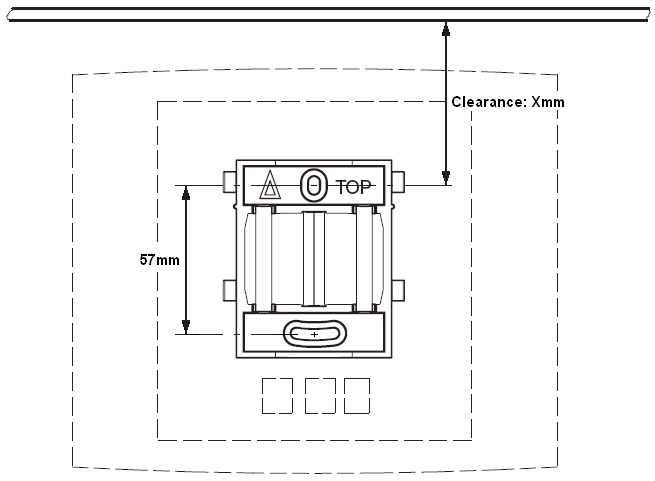
- Hold the mounting bracket with its flat side against the wall with the text ‘TOP’ upwards and mark the two holes. Observe the minimum distance between the top screw hole and the ceiling. This depends on the base station type as follows:
ADDITIONAL INFORMATION:Base Station TypeInternal AerialsExternal AerialsIPBS1Digital Base Station65mm160mmIPBS2/IPBS3100mm195mm
- Drill the two holes using a 6mm diameter drill and insert the included wall plugs.
- Position the mounting bracket with its flat side to the wall and fasten it with the two included 3.5mm diameter screws.