

AVAYA DOCUMENTATION CENTER
Find answers to your technical questions and learn how to use our products
Deploying Avaya Wireless DECT with IP Office
Setting the Base Station as the Master
A number of menus are disabled until the base station has been set as the master base station for the IP Office Avaya Wireless DECT system.
- In the left-hand panel select DECT, and then select the Master tab.
ADDITIONAL INFORMATION:

- Use the Mode drop-down box to select Active, and click OK.
- Click on the Reset required! message.
ADDITIONAL INFORMATION:
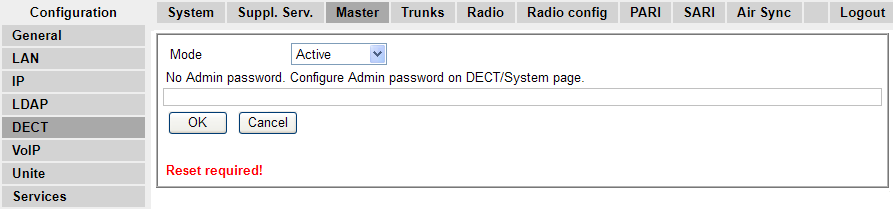
- Click OK.
ADDITIONAL INFORMATION:

- In the left-hand panel select DECT. Select the System tab.
ADDITIONAL INFORMATION:
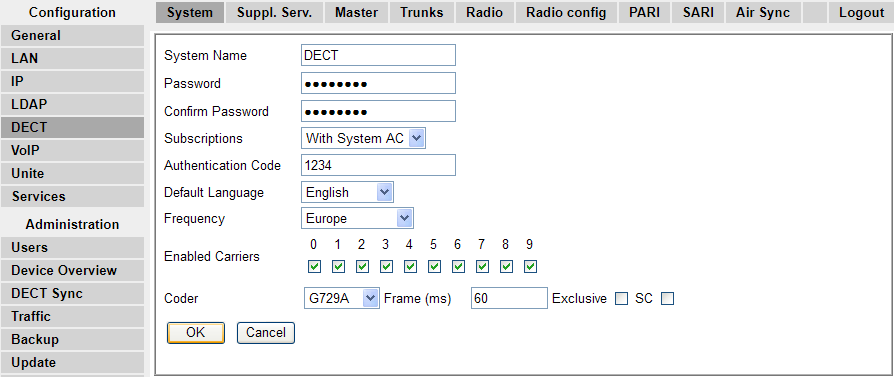
- Set and check the following values:
ADDITIONAL INFORMATION:
-
System NameEnter name to identify the DECT system. This must be a unique name if there are other DECT systems in the same area.
-
PasswordEnter the same password as being used for admin access to the base stations. The default is changeme. Re-enter the password in the Confirm Password field.
-
SubscriptionsSelect With System AC. This allows phones to be subscribed to the system using the system authentication code as set below.
-
Authentication CodeThis code is required by phones during subscription to the DECT system.
-
Default LanguageSelect the language required by the customer.
-
FrequencyYou must ensure that the correct region is selected. This affects the frequency used for DECT wireless signalling and other factors.
-
Do not adjust the Coder options.
-
Click OK.
-