

AVAYA DOCUMENTATION CENTER
Find answers to your technical questions and learn how to use our products
Deploying Avaya Wireless DECT with IP Office
Setting the PBX Switch Mode
The master base station needs to be configured for the type of PBX and the protocol to use for communication with the PBX.
- In the left-hand panel select DECT, and then select the Master tab.
ADDITIONAL INFORMATION:
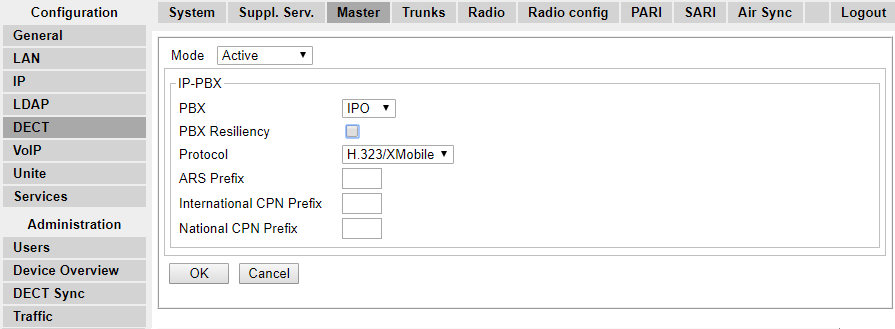
- Using the PBX drop-down list, select IPO.
- Check that the Protocol is set to H.323/XMobile.
- Click OK.
ADDITIONAL INFORMATION:
-
The message Reset required! is displayed. At this stage further changes are required so do not reset the base station.
-