

AVAYA DOCUMENTATION CENTER
Find answers to your technical questions and learn how to use our products
Deploying Avaya Wireless DECT with IP Office
Setting a Base Station to Slave Mode
There can be only one master base station in the IP Office Avaya Wireless DECT system. In this process we check that the base station is not set to act as a master and then configure its radio settings to access the master base station.
- In the left-hand column, select DECT. Select the Master tab.
ADDITIONAL INFORMATION:

- Check that the Mode is set to Off.
- Click OK.
- Select the Radio tab.
ADDITIONAL INFORMATION:
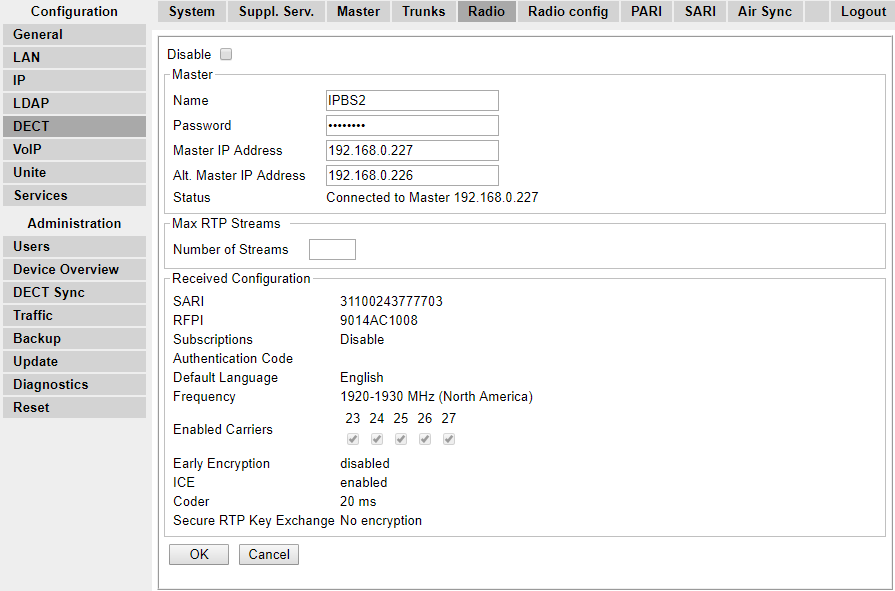
- Set the following details:
ADDITIONAL INFORMATION:
-
NameSet this to match the System Name set on the master base station's DECT | System tab.
-
PasswordSet this to match the Password set on the master base station's DECT | System tab.
-
Master IP AddressEnter the IP address of the master base station set on its LAN | IP tab.
-
Click OK.
-
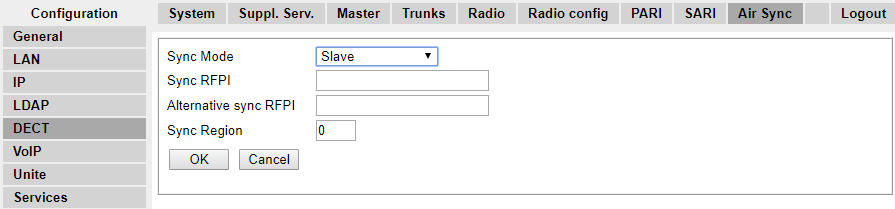
Select the Air Sync tab.
-
Set the Sync Mode to Slave.
-
Click OK.
-