

AVAYA DOCUMENTATION CENTER
Find answers to your technical questions and learn how to use our products
Deploying Avaya Wireless DECT with IP Office
Auto-Create Subscription Mode
|
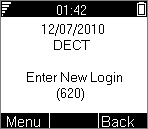
If the phone displays Enter New Login, it has been assigned a temporary extension number, shown in brackets. The temporary number is simply the highest existing extension number plus 1.
|