

AVAYA DOCUMENTATION CENTER
Find answers to your technical questions and learn how to use our products
Deploying Avaya Wireless DECT with IP Office
Site Survey Mode
The following method is used to put a subscribed phone into site survey mode.
- Go to the Call Time menu (Menu | Calls | Call Time).
- Activate the Admin menu by pressing
 *
*  * .
* . - In Admin menu, select DECT Info.
- Select Link. The phone will display information about the base station.
ADDITIONAL INFORMATION:
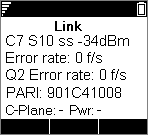
-
C7 S10This is the DECT signal carrier and slot.
-
ssThis is the signal strength. This is the main value that should be recorded and accessed as you perform the survey.SignalDescription-40dBStrong signal typically seen when a phone is close to the base station.-62dBMinimum signal strength at which a base station will accept a phone wanting to handover from another base station.-68dBSignal strength below which the phone will begin looking for a base station to which it can handover.-75dBAt this signal strength, the increased error rate will become apparent in the speech.-90dBAt this signal strength calls are likely to disconnect. This is also the limit for one base station to synchronize with another.
-
Error rate / Q2 Error rateThese are the error (corrupted) frames per second on the signals from and to the base station.
-
PARIThe PARI of the DECT system.
-
Bear:The current power output of the phone.
-
Pwr = on hook
-
LU = off hook, Low power
-
US = off hook, Normal power
-
EU = off hook, High power
-
-