

AVAYA DOCUMENTATION CENTER
Find answers to your technical questions and learn how to use our products
Administering Avaya IP Office using Manager
Sending Multiple Configurations
When Manager is running in Server Edition mode or SCN Management mode, it loads multiple configurations at the same time.
-
Click
 in the main toolbar or select File | Save Configuration from the menu bar.
-
The menu displayed only shows details for those systems where the system configuration has been changed and needs to be sent back to the system.
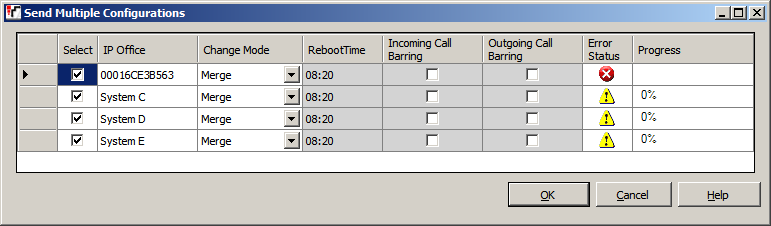 SettingDescriptionSelectBy default all systems with configuration changes are selected. If you want to exclude a system from having its configuration updated, either deselect it or cancel the whole process.Change ModeIf Manager thinks the changes made to the configuration settings are mergeable, it will select Merge by default, otherwise it will select Immediate.MergeSend the configuration settings without rebooting the system. This mode should only be used with settings that are mergeable. Refer to Mergeable Settings.ImmediateSend the configuration and then reboot the system.When FreeSend the configuration and reboot the system when there are no calls in progress. This mode can be combined with the Incoming Call Barring and Outgoing Call Barring options.Store OfflineIt is possible to add and edit a configuration file for a system that is not physically present. Store Offline saves that configuration on the Server Edition Primary in its file store. The same file is retrieved from there until the physical server is present, at which time you are prompted whether to use the stored file or the server's current configuration.TimedThe same as When Free but waits for a specific time after which it then wait for there to be no calls in progress. The time is specified by the Reboot Time. This mode can be combined with the Incoming Call Barring and Outgoing Call Barring options.Reboot TimeThis setting is used when the reboot mode Timed is selected. It sets the time for the system reboot. If the time is after midnight, the system's normal daily backup is canceled.Incoming Call BarringThis setting can be used when the reboot mode When Free or Timed is selected. It bars the receiving of any new calls.Outgoing Call BarringThis setting can be used when the reboot mode When Free or Timed is selected. It bars the making of any new calls.
 -
Click OK. The progress of the sending of each configuration is displayed.