

AVAYA DOCUMENTATION CENTER
Find answers to your technical questions and learn how to use our products
Administering Avaya IP Office using Manager
Programming Line Appearance ID Numbers
Line appearances are supported for analog, E1 PRI, T1, T1 PRI, and BRI PSTN trunks. They are not supported for E1R2, QSIG and IP trunks.
Note that setting and changing line settings including line appearance ID numbers requires the system to be rebooted.
Automatic Renumbering
- Select Tools | Line Renumber.
- Select the starting number required for line numbering and click OK.
- All lines that support Line Appearance ID will be numbered in sequence.
Manual Renumbering
- Start Manager and load the current configuration from the system.
- Select
 Line.
Line. - Select the line required.
ADDITIONAL INFORMATION:The tab through which line appearance ID numbers are set will vary depending on the type of line. A couple of examples are shown below.
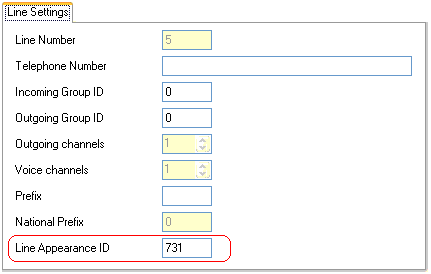
- Analog Line
ADDITIONAL INFORMATION:On the Line Settings tab select Line Appearance ID and enter the ID required.
- Basic/Primary Rate Trunks
ADDITIONAL INFORMATION:On the Channels tab select the individual channel and click Edit. Select Line Appearance ID and enter the required ID, then click OK. Repeat for all the channels required.

- Analog Line
- Click OKand repeat for any other lines.