

AVAYA DOCUMENTATION CENTER
Find answers to your technical questions and learn how to use our products
Maintenance Procedures for Communication Manager, Branch Gateways and Servers
Communication Manager report interpretation
Both the SAT report and the Web interface Server Alarms page contain similar information about Communication Manager’s hardware errors and alarms. Along with the information that you have gathered in the section titled Identify the problem and the information contained in the logs, you need to:
Find the first cause (initial failure) versus any consequences that occurred as a result of the initial failure.
Use timestamps to help reconstruct the incident, looking carefully for the first cause and the consequential alarms within seconds of each other.
The figure shows an example of a SAT alarm log that illustrates the cause-and-effect relationship between the “first cause” and its consequences.
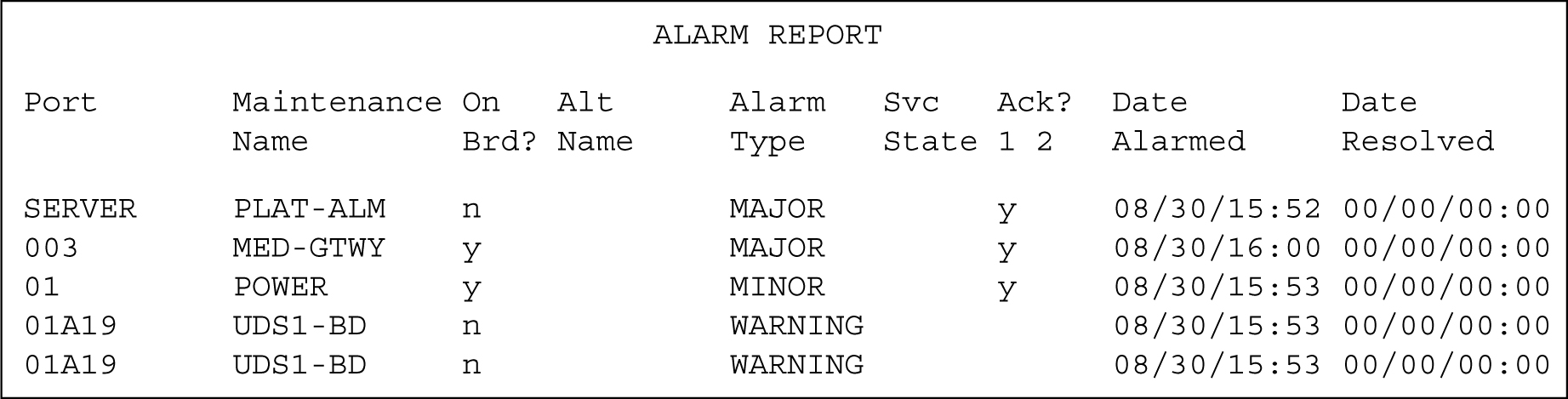
The figure shows that the Major alarms appear first in the log, followed the Minor and Warning alarms.
Using the timestamp to “divide and conquer,” note the following:
1st event (1st entry):
SERVER PLAT-ALM n MAJOR y 08/30/15:52 00/00/00:002nd event (3rd entry):
01 POWER y MINOR y 08/30/15:53 00/00/00:00This indicates that the gateway encountered a power outage at 3:53PM, however the log shows a major gateway alarm as the second entry because of the Major alarm level.
3rd event (2nd entry):
003 MED-GTWY y MAJOR y 08/30/16:00 00/00/00:00The subsequent warning alarms that occurred within the next two minutes are most likely consequences of the power outage.