AVAYA DOCUMENTATION CENTER
Find answers to your technical questions and learn how to use our products
Maintenance Procedures for Communication Manager, Branch Gateways and Servers
Signaling group assignments
You can assign multiple H.323 trunk groups to a single signaling group. However, when H.323 trunk groups have different attributes, assign each H.323 trunk group to a separate signaling group. An H.323 signaling group directs all incoming calls to a single trunk group, regardless of how many trunk groups are assigned to that signaling group. This is specified in the Trunk Group for Channel Selection field on the H.323 signaling group screen.
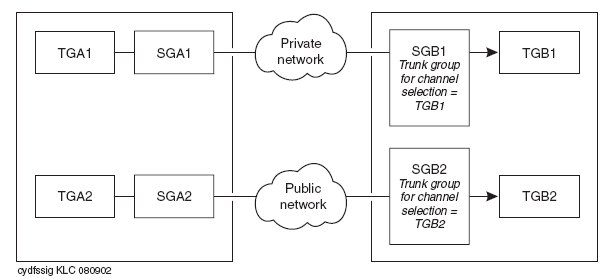
In the example shown in the figure, two trunk groups are assigned to the same signaling group on each of two switches, A and B. Trunk groups A1 and B1 are set up to route calls over a private network, and trunk groups A2 and B2 are set up to route calls over the public network. The signaling group on switch B terminates all incoming calls on trunk group B1 as specified by the Trunk Group for Channel Selection field. Calls from switch A to switch B using trunk group A1 and the private network are terminated on trunk group B1, as required. However, calls from switch A to switch B using trunk group A2 and the public network are also terminated on trunk group B1, not trunk group B2, which is not the required outcome.
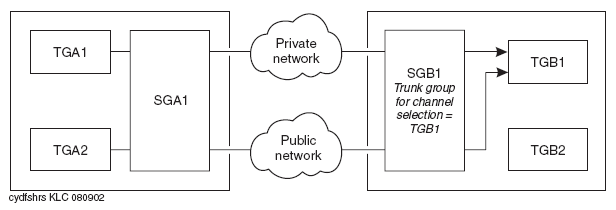
The solution to this problem is to set up a separate signaling group for each trunk group, as shown in the figure. More generally, set up a separate signaling group for each set of trunk groups that have common attributes.