AVAYA DOCUMENTATION CENTER
Find answers to your technical questions and learn how to use our products
Installing and Administering Avaya Room System C100 Series
TV-mounting Avaya Room System C130
About this task
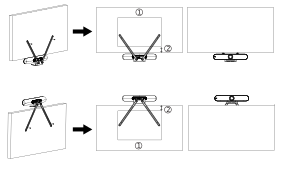
You can mount Avaya Room System C130 to a TV back panel using the TV-mounting brackets, an L-shaped codec-mounting bracket, screws and washers provided in the package. You can attach the assembled brackets with the codec to the upper or lower part of the TV back panel. The back panel must have industry-standard VESA mounting holes so that you can attach the brackets.
When TV-mounting Avaya Room System C130, place it so that you can either directly point at it with the remote control or at a vertical or horizontal angle of up to 15°. The remote control range is within 15 meters, but you can use a third-party IR repeater to increase the range.
Before you begin
Ensure that you check the TV-mounting package before installing the codec. The package must include the following items:
Two TV-mounting brackets with a hole diameter of 8.3 mm
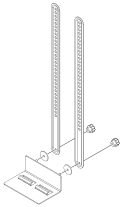
An L-shaped codec-mounting bracket
Two screws and two washers
Ensure that you also obtain two appropriate screws to attach the assembled brackets to the TV back panel.
Procedure
- Fasten the TV-mounting brackets to the codec-mounting bracket with a pair of screws and washers.
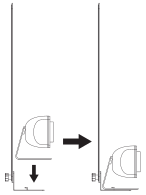
- Install the codec on the L-shaped bracket.
Example
The following diagram shows an example of attaching the brackets to the upper and lower part of the TV back panel, where "1" is a mounting pattern of 800 x 600 mm, and "2" is a reserved space of up to 210 mm: