AVAYA DOCUMENTATION CENTER
Find answers to your technical questions and learn how to use our products
Administering Avaya G430 Branch Gateway
Port redundancy configuration
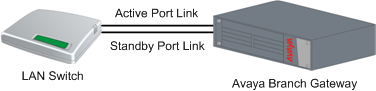
You can deploy the Branch Gateway port redundancy configuration in a LAN. You can connect Branch Gateway to an external LAN switch using both the Ethernet LAN ports located on the front panel of Branch Gateway.
Configure one of the ports on the Ethernet LAN as the active primary link and the other as the standby, disabled link. When the gateway determines a primary link failure, the gateway automatically fails over to the secondary link. Both LAN ports of the peer LAN switch ports must be enabled for the gateway to fail over to the secondary link.