

AVAYA DOCUMENTATION CENTER
Find answers to your technical questions and learn how to use our products
Deploying and Upgrading Avaya G450 Branch Gateway
Legal
© 2020-2026, Avaya LLC
All Rights Reserved.
Notice
While reasonable efforts have been made to ensure that the information in this document is complete and accurate at the time of printing, Avaya assumes no liability for any errors. Avaya reserves the right to make changes and corrections to the information in this document without the obligation to notify any person or organization of such changes.
Warranty
Avaya provides a limited warranty on Avaya hardware and software. Please refer to your agreement with Avaya to establish the terms of the limited warranty. In addition, Avaya’s standard warranty language as well as information regarding support for this product while under warranty is available to Avaya customers and other parties through the Avaya Support website: https://support.avaya.com/helpcenter/getGenericDetails?detailId=C20091120112456651010 under the link Warranty & Product Lifecycle
or such successor site as designated by Avaya. Please note that if the product(s) was purchased from an authorized Avaya channel partner outside of the United States and Canada, the warranty is provided by said Avaya Channel Partner and not by Avaya.
Preventing Toll Fraud
Toll Fraud
is the unauthorized use of your telecommunications system by an unauthorized party (for example, a person who is not a corporate employee, agent, subcontractor, or is not working on your company's behalf). Be aware that there can be a risk of Toll Fraud associated with your system and that, if Toll Fraud occurs, it can result in substantial additional charges for your telecommunications services.
Avaya Toll Fraud intervention
If You suspect that You are being victimized by Toll Fraud and You need technical assistance or support, please contact your Avaya Sales Representative.
Documentation disclaimer
Documentation
means information published in varying media which may include product information, subscription or service descriptions, operating instructions and performance specifications that are generally made available to users of products. Documentation does not include marketing materials. Avaya shall not be responsible for any modifications, additions, or deletions to the original published version of Documentation unless such modifications, additions, or deletions were performed by or on the express behalf of Avaya. End user agrees to indemnify and hold harmless Avaya, Avaya's agents, servants and employees against all claims, lawsuits, demands and judgments arising out of, or in connection with, subsequent modifications, additions or deletions to this documentation, to the extent made by End user.
Link disclaimer
Avaya is not responsible for the contents or reliability of any linked websites referenced within this site or Documentation provided by Avaya. Avaya is not responsible for the accuracy of any information, statement or content provided on these sites and does not necessarily endorse the products, services, or information described or offered within them. Avaya does not guarantee that these links will work all the time and has no control over the availability of the linked pages.
Copyright
Except where expressly stated otherwise, no use should be made of materials on this site, the Documentation, Software, Hosted Service, or hardware provided by Avaya. All content on this site, the documentation, Hosted Service, and the product provided by Avaya including the selection, arrangement and design of the content is owned either by Avaya or its licensors and is protected by copyright and other intellectual property laws including the sui generis rights relating to the protection of databases. You may not modify, copy, reproduce, republish, upload, post, transmit or distribute in any way any content, in whole or in part, including any code and software unless expressly authorized by Avaya. Unauthorized reproduction, transmission, dissemination, storage, or use without the express written consent of Avaya can be a criminal, as well as a civil offense under the applicable law.
Virtualization
The following applies if the product is deployed on a virtual machine. Each product has its own ordering code and license types. Unless otherwise stated, each Instance of a product must be separately licensed and ordered. For example, if the end user customer or Avaya Channel Partner would like to install two Instances of the same type of products, then two products of that type must be ordered.
How to Get Help
For additional support telephone numbers, go to the Avaya Support website: http://www.avaya.com/support. If you are:
Within the United States, click the Escalation Contacts link that is located under the Support Tools heading. Then click the appropriate link for the type of support that you need.
Outside the United States, click the Escalation Contacts link that is located under the Support Tools heading. Then click the International Services link that includes telephone numbers for the international Centers of Excellence.
Providing Telecommunications Security
Telecommunications security (of voice, data, and/or video communications) is the prevention of any type of intrusion to (that is, either unauthorized or malicious access to or use of) your company's telecommunications equipment by some party.
Your company's telecommunications equipment
includes both this Avaya product and any other voice/data/video equipment that could be accessed via this Avaya product (that is, networked equipment
).
An outside party
is anyone who is not a corporate employee, agent, subcontractor, or is not working on your company's behalf. Whereas, a malicious party
is anyone (including someone who may be otherwise authorized) who accesses your telecommunications equipment with either malicious or mischievous intent.
Such intrusions may be either to/through synchronous (time-multiplexed and/or circuit-based), or asynchronous (character-, message-, or packet-based) equipment, or interfaces for reasons of:
Utilization (of capabilities special to the accessed equipment)
Theft (such as, of intellectual property, financial assets, or toll facility access)
Eavesdropping (privacy invasions to humans)
Mischief (troubling, but apparently innocuous, tampering)
Harm (such as harmful tampering, data loss or alteration, regardless of motive or intent)
Be aware that there may be a risk of unauthorized intrusions associated with your system and/or its networked equipment. Also realize that, if such an intrusion should occur, it could result in a variety of losses to your company (including but not limited to, human/data privacy, intellectual property, material assets, financial resources, labor costs, and/or legal costs).
Responsibility for Your Company’s Telecommunications Security
The final responsibility for securing both this system and its networked equipment rests with you - Avaya’s customer system administrator, your telecommunications peers, and your managers. Base the fulfillment of your responsibility on acquired knowledge and resources from a variety of sources including but not limited to:
Installation documents
System administration documents
Security documents
Hardware-/software-based security tools
Shared information between you and your peers
Telecommunications security experts
To prevent intrusions to your telecommunications equipment, you and your peers should carefully program and configure:
Your Avaya-provided telecommunications systems and their interfaces
Your Avaya-provided software applications, as well as their underlying hardware/software platforms and interfaces
Any other equipment networked to your Avaya products
TCP/IP Facilities
Customers may experience differences in product performance, reliability and security depending upon network configurations/design and topologies, even when the product performs as warranted.
Product Safety Standards
This product complies with and conforms to the following international Product Safety standards as applicable:
IEC 62368-1 latest edition, including all relevant national deviations as listed in the IECEE Bulletin—Product Category OFF: IT and Office Equipment.
CAN/CSA-C22.2 No. 62368-1 / UL 62368-1 latest edition.
This product may contain Class 1 laser devices.
Class 1 Laser Product
Luokan 1 Laserlaite
Klass 1 Laser Apparat
Electromagnetic Compatibility (EMC)
Avaya LLC is not responsible for any radio or television interference caused by unauthorized modifications of this equipment or the substitution or attachment of connecting cables and equipment other than those specified by Avaya LLC. The correction of interference caused by such unauthorized modifications, substitution or attachment will be the responsibility of the user. Pursuant to Part 15 of the Federal Communications Commission (FCC) Rules, the user is cautioned that changes or modifications not expressly approved by Avaya LLC. could void the user’s authority to operate this equipment.
Federal Communications Commission Part 15 Statement:
For a Class A digital device or peripheral:
Note:
This equipment has been tested and found to comply with the limits for a Class A digital device, pursuant to Part 15 of the FCC Rules. These limits are designed to provide reasonable protection against harmful interference when the equipment is operated in a commercial environment. This equipment generates, uses, and can radiate radio frequency energy and, if not installed and used in accordance with the instruction manual, may cause harmful interference to radio communications. Operation of this equipment in a residential area is likely to cause harmful interference in which case the user will be required to correct the interference at his own expense.
For a Class B digital device or peripheral:
Note:
This equipment has been tested and found to comply with the limits for a Class B digital device, pursuant to Part 15 of the FCC Rules. These limits are designed to provide reasonable protection against harmful interference in a residential installation. This equipment generates, uses, and can radiate radio frequency energy and, if not installed and used in accordance with the instruction manual, may cause harmful interference to radio communications. However, there is no guarantee that interference will not occur in a particular installation. If this equipment does cause harmful interference to radio or television reception, which can be determined by turning the equipment off and on, the user is encouraged to try to correct the interference by one or more of the following measures:
Reorient or relocate the receiving antenna.
Increase the separation between the equipment and receiver.
Connect the equipment into an outlet on a circuit different from that to which the receiver is connected.
Consult the dealer or an experienced radio/TV technician for help.
Equipment With Direct Inward Dialing (“DID”):
Allowing this equipment to be operated in such a manner as to not provide proper answer supervision is a violation of Part 68 of the FCC’s rules.
Proper Answer Supervision is when:
This equipment returns answer supervision to the public switched telephone network (PSTN) when DID calls are:
answered by the called station,
answered by the attendant,
routed to a recorded announcement that can be administered by the customer premises equipment (CPE) user
routed to a dial prompt
This equipment returns answer supervision signals on all (DID) calls forwarded back to the PSTN.
Permissible exceptions are:
A call is unanswered
A busy tone is received
A reorder tone is received
Avaya attests that this registered equipment is capable of providing users access to interstate providers of operator services through the use of access codes. Modification of this equipment by call aggregators to block access dialing codes is a violation of the Telephone Operator Consumers Act of 1990.
Automatic Dialers:
When programming emergency numbers and (or) making test calls to emergency numbers:
Remain on the line and briefly explain to the dispatcher the reason for the call.
Perform such activities in the off-peak hours, such as early morning or late evenings.
Toll Restriction and least Cost Routing Equipment:
The software contained in this equipment to allow user access to the network must be upgraded to recognize newly established network area codes and exchange codes as they are placed into service.
Failure to upgrade the premises systems or peripheral equipment to recognize the new codes as they are established will restrict the customer and the customer’s employees from gaining access to the network and to these codes.
For equipment approved prior to July 23, 2001:
This equipment complies with Part 68 of the FCC rules. On either the rear or inside the front cover of this equipment is a label that contains, among other information, the FCC registration number, and ringer equivalence number (REN) for this equipment. If requested, this information must be provided to the telephone company.
For equipment approved after July 23, 2001:
This equipment complies with Part 68 of the FCC rules and the requirements adopted by the Administrative Council on Terminal Attachments (ACTA). On the rear of this equipment is a label that contains, among other information, a product identifier in the format US:AAAEQ##TXXX. If requested, this number must be provided to the telephone company.
The REN is used to determine the quantity of devices that may be connected to the telephone line. Excessive RENs on the telephone line may result in devices not ringing in response to an incoming call. In most, but not all areas, the sum of RENs should not exceed 5.0.
L’indice d’équivalence de la sonnerie (IES) sert à indiquer le nombre maximal de terminaux qui peuvent être raccordés à une interface téléphonique. La terminaison d’une interface peut consister en une combinaison quelconque de dispositifs, à la seule condition que la somme d’indices d’équivalence de la sonnerie de tous les dispositifs n’excède pas cinq.
To be certain of the number of devices that may be connected to a line, as determined by the total RENs, contact the local telephone company. For products approved after July 23, 2001, the REN for this product is part of the product identifier that has the format US:AAAEQ##TXXX. The digits represented by ## are the REN without a decimal point (for example, 03 is a REN of 0.3). For earlier products, the REN is separately shown on the label.
Means of Connection:
Connection of this equipment to the telephone network is shown in the following table:
Manufacturer’s Port Identifier |
FIC Code |
SOC/ REN/A.S. Code |
Network Jacks |
|---|---|---|---|
Off premises station |
OL13C |
9.0F |
RJ2GX, RJ21X, RJ11C |
DID trunk |
02RV2.T |
AS.2 |
RJ2GX, RJ21X, RJ11C |
CO trunk |
02GS2 |
0.3A |
RJ21X, RJ11C |
02LS2 |
0.3A |
RJ21X, RJ11C |
|
Tie trunk |
TL31M |
9.0F |
RJ2GX |
Basic Rate Interface |
02IS5 |
6.0F, 6.0Y |
RJ49C |
1.544 digital interface |
04DU9.BN |
6.0F |
RJ48C, RJ48M |
04DU9.1KN |
6.0F |
RJ48C, RJ48M |
|
04DU9.1SN |
6.0F |
RJ48C, RJ48M |
|
120A4 channel service unit |
04DU9.DN |
6.0Y |
RJ48C |
If this equipment causes harm to the telephone network, the telephone company will notify you in advance that temporary discontinuance of service may be required. But if advance notice is not practical, the telephone company will notify the customer as soon as possible. Also, you will be advised of your right to file a complaint with the FCC if you believe it is necessary.
The telephone company may make changes in its facilities, equipment, operations or procedures that could affect the operation of the equipment. If this happens, the telephone company will provide advance notice in order for you to make necessary modifications to maintain uninterrupted service.
If trouble is experienced with this equipment, for repair or warranty information, please contact the Technical Service Center at 1-800-242- 2121 or contact your local Avaya representative. If the equipment is causing harm to the telephone network, the telephone company may request that you disconnect the equipment until the problem is resolved.
A plug and jack used to connect this equipment to the premises wiring and telephone network must comply with the applicable FCC Part 68 rules and requirements adopted by the ACTA. A compliant telephone cord and modular plug is provided with this product. It is designed to be connected to a compatible modular jack that is also compliant.
Connection to party line service is subject to state tariffs. Contact the state public utility commission, public service commission or corporation commission for information.
Installation and Repairs
Before installing this equipment, users should ensure that it is permissible to be connected to the facilities of the local telecommunications company. The equipment must also be installed using an acceptable method of connection. The customer should be aware that compliance with the above conditions may not prevent degradation of service in some situations.
Repairs to certified equipment should be coordinated by a representative designated by the supplier. It is recommended that repairs be performed by Avaya certified technicians.
FCC Part 68 Supplier’s Declarations of Conformity
Avaya LLC in the United States of America hereby certifies that the equipment described in this document and bearing a TIA TSB-168 label identification number complies with the FCC’s Rules and Regulations 47 CFR Part 68, and the Administrative Council on Terminal Attachments (ACTA) adopted technical criteria.
Avaya further asserts that Avaya handset-equipped terminal equipment described in this document complies with Paragraph 68.316 of the FCC Rules and Regulations defining Hearing Aid Compatibility and is deemed compatible with hearing aids.
Copies of SDoCs signed by the Responsible Party in the U. S. can be obtained by contacting your local sales representative and are available by contacting Avaya Support website at: https://support.avaya.com.
Canadian Conformity Information
This Class A (or B) digital apparatus complies with Canadian ICES-003.
Cet appareil numérique de la classe A (ou B) est conforme à la norme NMB-003 du Canada.
This product meets the applicable Industry Canada technical specifications/Le présent materiel est conforme aux specifications techniques applicables d’Industrie Canada.
European Union Declarations of Conformity

This device when installed complies with the essential requirements and other relevant provisions of the EMC Directive 2014/30/EU, and Safety LV Directive 2014/35/EU.
A copy of the Declaration may be obtained from https://support.avaya.com or Avaya LLC, 350 Mt. Kemble Avenue. Morristown, NJ USA 07960 USA.
European Union Battery Directive
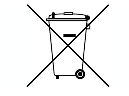
Avaya LLC supports European Union Battery Directive 2006/66/EC. Certain Avaya LLC products contain lithium batteries. These batteries are not customer or field replaceable parts. Do not disassemble. Batteries may pose a hazard if mishandled.
Japan
The power cord set included in the shipment or associated with the product is meant to be used with the said product only. Do not use the cord set for any other purpose. Any non-recommended usage could lead to hazardous incidents like fire disaster, electric shock, and faulty operation.

If this is a Class A device:
This is a Class A product based on the standard of the Voluntary Control Council for Interference by Information Technology Equipment (VCCI). If this equipment is used in a domestic environment, radio disturbance may occur, in which case, the user may be required to take corrective actions.

If this is a Class B device:
This is a Class B product based on the standard of the Voluntary Control Council for Interference from Information Technology Equipment (VCCI). If this is used near a radio or television receiver in a domestic environment, it may cause radio interference. Install and use the equipment according to the instruction manual.

Trademarks
The trademarks, logos and service marks (Marks
) displayed in this site, the Documentation, Hosted Service(s), and product(s) provided by Avaya are the registered or unregistered Marks of Avaya, its affiliates, its licensors, its suppliers, or other third parties. Users are not permitted to use such Marks without prior written consent from Avaya or such third party which may own the Mark. Nothing contained in this site, the Documentation, Hosted Service(s) and product(s) should be construed as granting, by implication, estoppel, or otherwise, any license or right in and to the Marks without the express written permission of Avaya or the applicable third party.
Avaya is a registered trademark of Avaya LLC.
All non-Avaya trademarks are the property of their respective owners.
Downloading Documentation
For the most current versions of Documentation, see the Avaya Support website: https://support.avaya.com, or such successor site as designated by Avaya.
Contact Avaya Support
See the Avaya Support website: https://support.avaya.com for Product or Cloud Service notices and articles, or to report a problem with your Avaya Product or Cloud Service. For a list of support telephone numbers and contact addresses, go to the Avaya Support website: https://support.avaya.com (or such successor site as designated by Avaya), scroll to the bottom of the page, and select Contact Avaya Support.