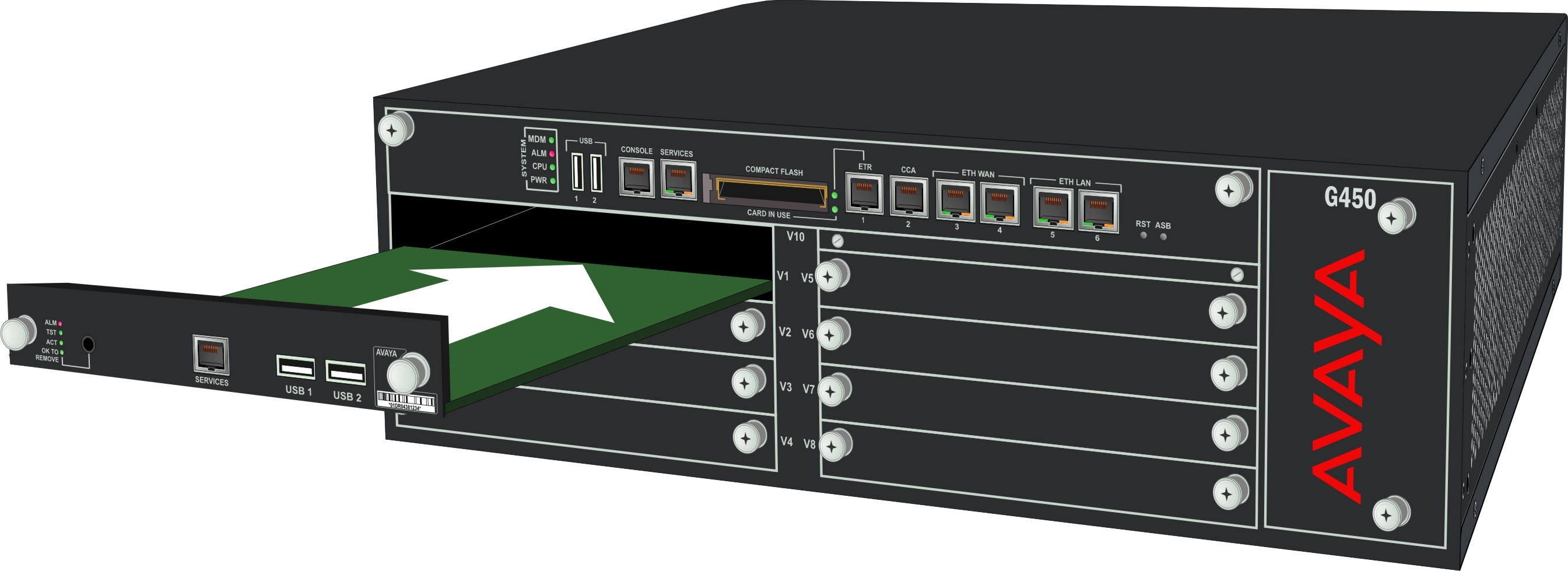
Installing S8300 Server

Last Updated : Dec 22, 2022 |

About this task

You can install an S8300 Server in slot V1 on the left side of the Branch Gateway.

Procedure

  1. Remove the plate above slot V1.
  2. Remove the blank plate from slot V1.
  3. Align the server with the V1 bay opening and engage both sides of the module with the interior guides.
  4. Slide the server slowly into the chassis, maintaining even pressure to ensure that the module does not get twisted or disengaged from the guides.


  5. Apply firm pressure to engage the connectors.

    The connector has pins of different length. Long pins get engaged first to provide grounding. Medium and short length pins provide power and signal.

  6. Tighten the spring-loaded captive screws to lock the media module into the chassis.
  7. Remove the plate labeled Remove before removing or inserting S8300 module above the slot V1 and tighten the screws on the front plate.
  8. After you insert the server module, insert the other media modules.

    Make sure to insert each module in a slot corresponding to the module type.